CoreAI
Harbor
Harbor documentation
Harbor
What is Harbor?
Harbor is an open-source cloud-native artifact registry that stores, signs, and scans container images and Helm charts. It extends the Docker Distribution by adding functionalities such as:
- Role-based access control (RBAC)
- Image vulnerability scanning
- Image signing and verification
- Replication between registries
- Audit logging
- Multi-tenancy support
Harbor is a CNCF (Cloud Native Computing Foundation) graduated project and is widely used in enterprise environments to manage container images securely.
Purpose of Harbor
Harbor is designed to:
- Secure container image storage with integrated vulnerability scanning and content trust.
- Support enterprise-grade access control with RBAC and LDAP/AD integration.
- Enable multi-cloud and hybrid deployments via replication policies.
- Provide a user-friendly UI and RESTful API for managing images and charts.
- Integrate with CI/CD pipelines for automated image management.
Installation Guide
Harbor can be installed inside or outside a Kubernetes cluster. We strongly recommend to install Habror as a standalone outside the cluster to avoid cascading failures in case of a Kubernetes incident.
Prerequisites
- Docker and Docker Compose installed
- Linux server or VM (Ubuntu, CentOS, etc.)
- Minimum 2 CPU cores, 4 GB RAM
- Root or sudo access
- SSL certificates
Step-by-Step Installation
Declare server variables and disable firewall
export harbor_dns="<registry_name>.<domain_name>"
export harbor_ip="XXX.XXX.XXX.XXX"
export harbor_port_ssl="443"
export harbor_port_nossl="80"
export harbor_folder="/opt/harbor"
export certificate_folder="${harbor_folder}/certificates"

# DISABLE SYSTEM FIREWALLD AND SELINUX
# If you want keep theses activated you must open the port 80 & 443
# and make an SEContext for the folder "/data"
sudo systemctl stop firewalld
sudo systemctl disable firewalld
sudo sed -i s/^SELINUX=.*$/SELINUX=disabled/ /etc/selinux/config
sudo cat /etc/selinux/config | grep SELINUX=
sudo setenforce 0
Uninstall podman (only for RHEL distributions) and replace it with docker and docker-compose.
Download the Harbor artifacts.
sudo dnf erase podman
sudo dnf config-manager --add-repo https://download.docker.com/linux/rhel/docker-ce.repo
sudo dnf install docker-ce docker-ce-cli containerd.io docker-buildx-plugin docker-compose-plugin -y
wget https://github.com/goharbor/harbor/releases/download/v2.12.2/harbor-offline-installer-v2.12.2.tgz
mv harbor-offline-installer-v2.12.2.tgz ${harbor_folder}/../
cd ${harbor_folder}/../
tar xzvf harbor-offline-installer-v2.12.2.tgz
rm -f harbor-offline-installer-v2.12.2.tgz
Create all necessary sub-folders for the Harbor instance.
mkdir -p $harbor_folder/volume
mkdir -p $harbor_folder/certificates/
mkdir -p $harbor_folder/data # This folder contain the image container after the installation
mkdir -p $harbor_folder/secret/keys
mkdir -p $harbor_folder/common/config
mkdir -p $harbor_folder/compose_location
Configure and deploy harbor.yml
cp $harbor_folder/harbor.yml.tmpl $harbor_folder/harbor.yml
sed -i 's|reg.mydomain.com|$harbor_dns|g' $harbor_folder/harbor.yml
sed -i 's|/your/certificate/path|'$harbor_folder'/certificates/certificate.crt|g' $harbor_folder/harbor.yml
sed -i 's|/your/private/key/path|'$harbor_folder'/certificates/certificate.key|g' $harbor_folder/harbor.yml
if netstat -tuln | grep ":80 " > /dev/null;then
  sed -i 's|80|'${harbor_port_nossl_alt}'|g' $harbor_folder/harbor.yml
fi
if [ "${http_proxy}" != "" ];then
  sed -i 's|  http_proxy:|  http_proxy:'${http_proxy}'|g' $harbor_folder/harbor.yml
fi
if [ "${https_proxy}" != "" ];then
  sed -i 's|  https_proxy:|  https_proxy:'${https_proxy}'|g' $harbor_folder/harbor.yml
fi
if [ "${no_proxy}" != "" ];then
  sed -i 's|  no_proxy:|  no_proxy:'${no_proxy}'|g' $harbor_folder/harbor.yml
fi
sed -i 's|reg.mydomain.com|'${harbor_dns}'|g' $harbor_folder/harbor.yml
sed -i 's|/your/certificate/path|'$harbor_folder'/certificates/certificate.crt|g' $harbor_folder/harbor.yml
sed -i 's|/your/private/key/path|'$harbor_folder'/certificates/certificaet.key|g' $harbor_folder/harbor.yml
sed -i 's|harbor_admin_password: Harbor12345|harbor_admin_password: '$password_harbor'|g' $harbor_folder/harbor.yml

sed -i 's|data_volume: /data|data_volume: '${harbor_folder}'/volume|g' $harbor_folder/harbor.yml
logger "Copy Certificates" YELLOW
if [ -f "$harbor_folder/certificats/certificate.crt" ];then rm -f $harbor_folder/certificates/certificate.crt; fi
cp $certificat_folder/myCA/certs/${name_registry}.crt $harbor_folder/certificates/certificate.crt
if [ -f "$harbor_folder/certificates/certificate.key" ];then rm -f $harbor_folder/certificates/certificate.key; fi
cp $certificat_folder/myCA/private/${name_registry}.key $harbor_folder/certificates/certificate.key
if [ -f "$harbor_folder/certificates/cacert.pem" ];then rm -f $harbor_folder/certificates/cacert.pem; fi
cp $certificat_folder/myCA/certs/${cert_crt_caroot} $harbor_folder/certificates/cacert.pem
cd $harbor_folder/
logger "Restart docker" YELLOW
sudo systemctl enable docker
sudo systemctl restart docker
sudo ./install.sh --with-trivy
To stop/start harbor :
cd $harbor_folder/
docker compose down
docker compose up -d # in deamon mode
Quotas
Purpose of Quotas
Quotas help you:
- Control disk usage per project
- Prevent resource exhaustion
- Enforce fair usage policies
- Improve system stability and predictability
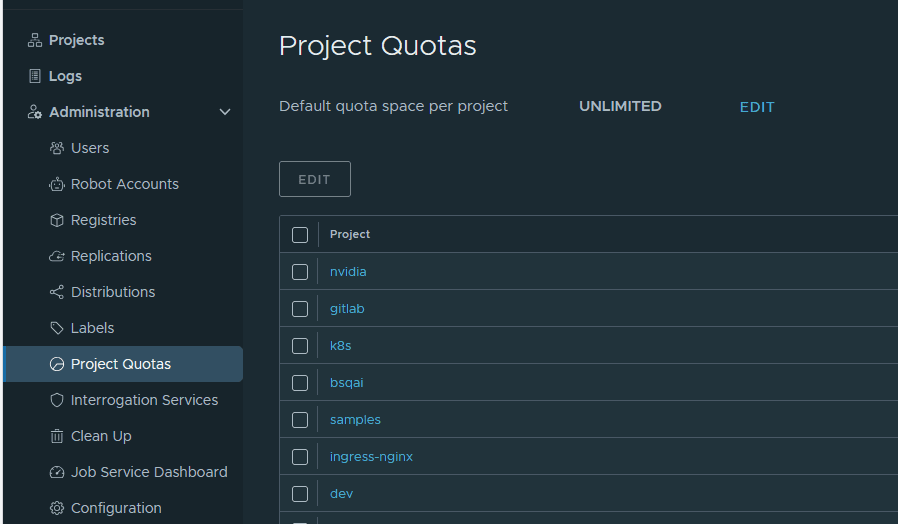
They are defined per project, and Harbor tracks the total size of all artifacts (images, charts, etc.) stored in that project.
You can access and edit quotas through the "Project Quotas" menu on the "Administration" panel.
Replication
Replication in Harbor allows you to automatically synchronize container images and Helm charts between Harbor and other registries. This is useful for:
- Multi-region deployments (e.g., syncing images between EU and US data centers)
- Disaster recovery
- CI/CD pipelines that push to staging and production registries
- Hybrid cloud setups (e.g., syncing between on-prem Harbor and cloud registries like AWS ECR or Docker Hub)
Harbor supports push and pull replication modes and can replicate to/from:
- Another Harbor instance
- Docker Hub
- Quay
- Google Container Registry (GCR)
- Amazon Elastic Container Registry (ECR)
- Azure Container Registry (ACR)
- Helm Chart repositories
Replication is configured via Replication Rules. Each rule defines:
- Source registry (Harbor or external)
- Target registry
- Trigger type (manual, scheduled, or event-based)
- Filters (e.g., by repository name or tag)
- Direction: Push (from Harbor to target) or Pull (from target to Harbor)
Below is a sample script allowing you pull images from an external Azure Container Registry (ACR) :
registry_source="example_registry"
reponse=$(curl -s -k -u "${login_harbor}:${password_harbor}" -X GET "$url_api_harbor/registries")
id_source=$(echo $reponse | jq '.[] | select(.name == "'$registry_source'") | .id')
if [ "${id_source}" == "" ];then
	logger "The Source Registry doesn't exist yet : now creating new replication" YELLOW
	curl -k -s -u "${login_harbor}:${password_harbor}" -X POST "$url_api_harbor/registries" -H "Content-Type: application/json" -d '{"type": "'$type_src'","name": "'$registry_source'","description": "'$azure_acr_desc'","url": "'$azure_url_src'","credential": {"access_key": "'$login_src'","access_secret": "'$password_src'","type":"basic"}}'
	reponse=$(curl -s -k -u "${login_harbor}:${password_harbor}" -X GET "$url_api_harbor/registries")
	id_source=$(echo $reponse | jq '.[] | select(.name == "'$registry_source'") | .id')
	if [ "${id_source}" != "" ];then
		reponse=$(curl -s -k -u "${login_harbor}:${password_harbor}" -H "Content-Type: application/json" -X GET "$url_api_harbor/replication/policies");
		id_replic=$(echo $reponse | jq '.[] | select(.name == "sync_'$registry_source'") | .id')
		if [ "${id_replic}" == "" ];then
			logger "Source Registy already don t exist : Reference it" YELLOW
			curl -k -s -u "${login_harbor}:${password_harbor}" -X POST "$url_api_harbor/replication/policies" -H "Content-Type: application/json" -d '{"name": "sync_'$registry_source'","description": "Synchro Init '$nom'","src_registry": {"id": '$id_source'},"dest_registry": {"id": 0},"trigger": {"type": "manual"},"enabled": true}'
		else
			logger "Source Registy replication already exist" CYAN
		fi
	else
		logger "Error declaring Source Registry in Harbor" RED
		exit 1
	fi
else
	logger "Source Registry already exist" CYAN
fi
reponse=$(curl -s -k -u "${login_harbor}:${password_harbor}" -H "Content-Type: application/json" -X GET "$url_api_harbor/replication/policies");
id_replic=$(echo $reponse | jq '.[] | select(.name == "sync_'$registry_source'") | .id')
if [ "${id_replic}" != "" ];then
	curl -k -s -u "${login_harbor}:${password_harbor}" -X POST -H "Content-Type: application/json"  "$url_api_harbor/replication/executions" -d '{"policy_id": '$id_replic'}'
	logger "END SYNC DECLARE" GREEN
	logger "Waiting for new project to be created" YELLOW
	sleep 5
else
	logger "Error in setting up replication with ACR" RED
	exit 1
fi
project_id=""
reponse=$(curl -k -s -u "${login_harbor}:${password_harbor}" -X GET -H "Content-Type: application/json"  "$url_api_harbor/projects")
project_id=$(echo $reponse | jq '.[] | select(.name == "core") | .project_id')
while [ "${project_id}" == "" ]; do
	sleep 5
	echo "Wait... $registry_source"
	reponse=$(curl -k -s -u "${login_harbor}:${password_harbor}" -X GET -H "Content-Type: application/json"  "$url_api_harbor/projects")
	project_id=$(echo $reponse | jq '.[] | select(.name == "core") | .project_id')
done
if [ "$project_id" != "" ];then
	curl -k -s -u "${login_harbor}:${password_harbor}" -X PUT -H "Content-Type: application/json"  "$url_api_harbor/projects/${project_id}" -d '{ "metadata": {"public": "false","auto_scan": "true"}}'
	logger "Project core is set to private and auto-scan" YELLOW
	test_member=$(curl -k -s -u "${login_harbor}:${password_harbor}" -X GET -H "Content-Type: application/json"  "$url_api_harbor/projects/${project_id}/members" | jq '.[]  | select(.entity_id == '${user_id}')' | wc -l)
else
	logger "Error when retrieving "core" project" RED
	exit 1
fi
Image scanning
Overview
Image scanning in Harbor is a security feature that automatically analyzes container images for known vulnerabilities. It helps developers and DevOps teams ensure that the images they use or distribute do not contain critical security flaws. Harbor integrates with vulnerability scanners such as:
- Trivy (default since Harbor v2.0)
- Clair (optional legacy support)
These scanners inspect image layers and compare them against vulnerability databases (e.g., CVEs from NVD, Red Hat, Debian, etc.).
Purpose of Image Scanning
- Security assurance: Detect known vulnerabilities before deploying containers.
- Compliance: Meet organizational or regulatory security standards.
- Automation: Integrate scanning into CI/CD pipelines for continuous security.
- Visibility: Provide detailed reports on vulnerabilities per image and tag.
How It Works
- Image is pushed to Harbor
- Harbor triggers a scan job (if auto-scan is enabled)
- The scanner (e.g., Trivy) analyzes the image layers
- Results are stored and displayed in the UI
- Developers can view:
- Vulnerability severity (Critical, High, Medium, Low, Unknown)
- CVE identifiers
- Affected packages
- Fix versions (if available)
Usage
You can use scanns via the user interface :
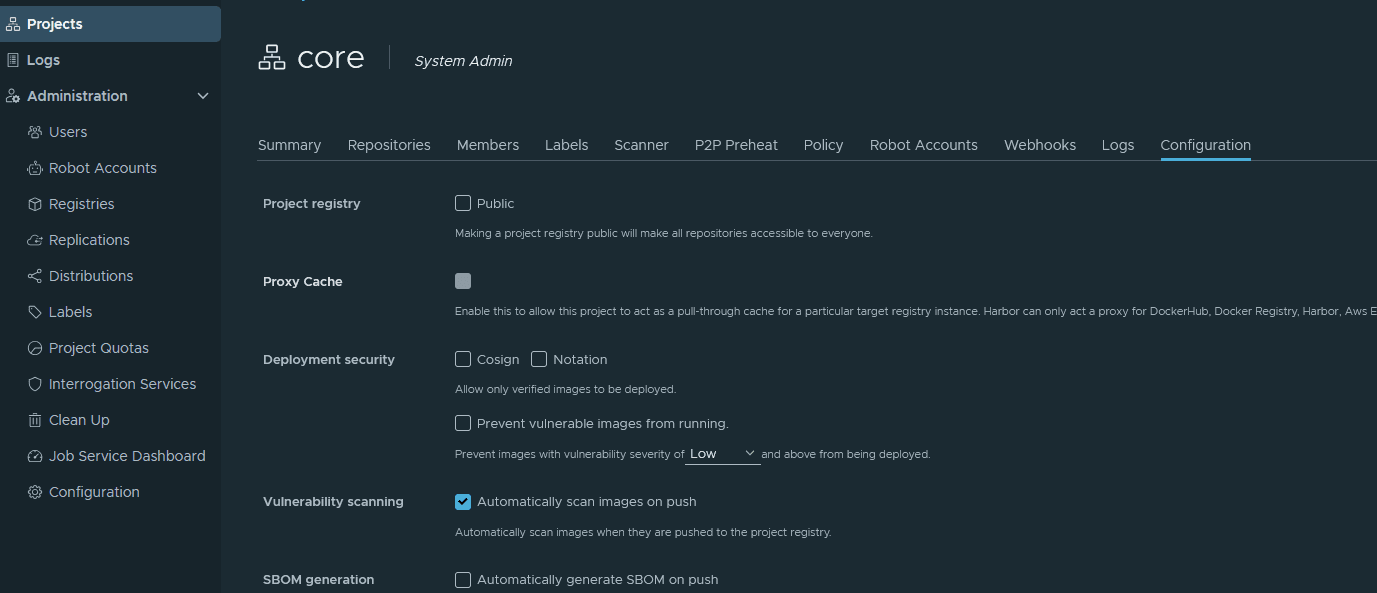
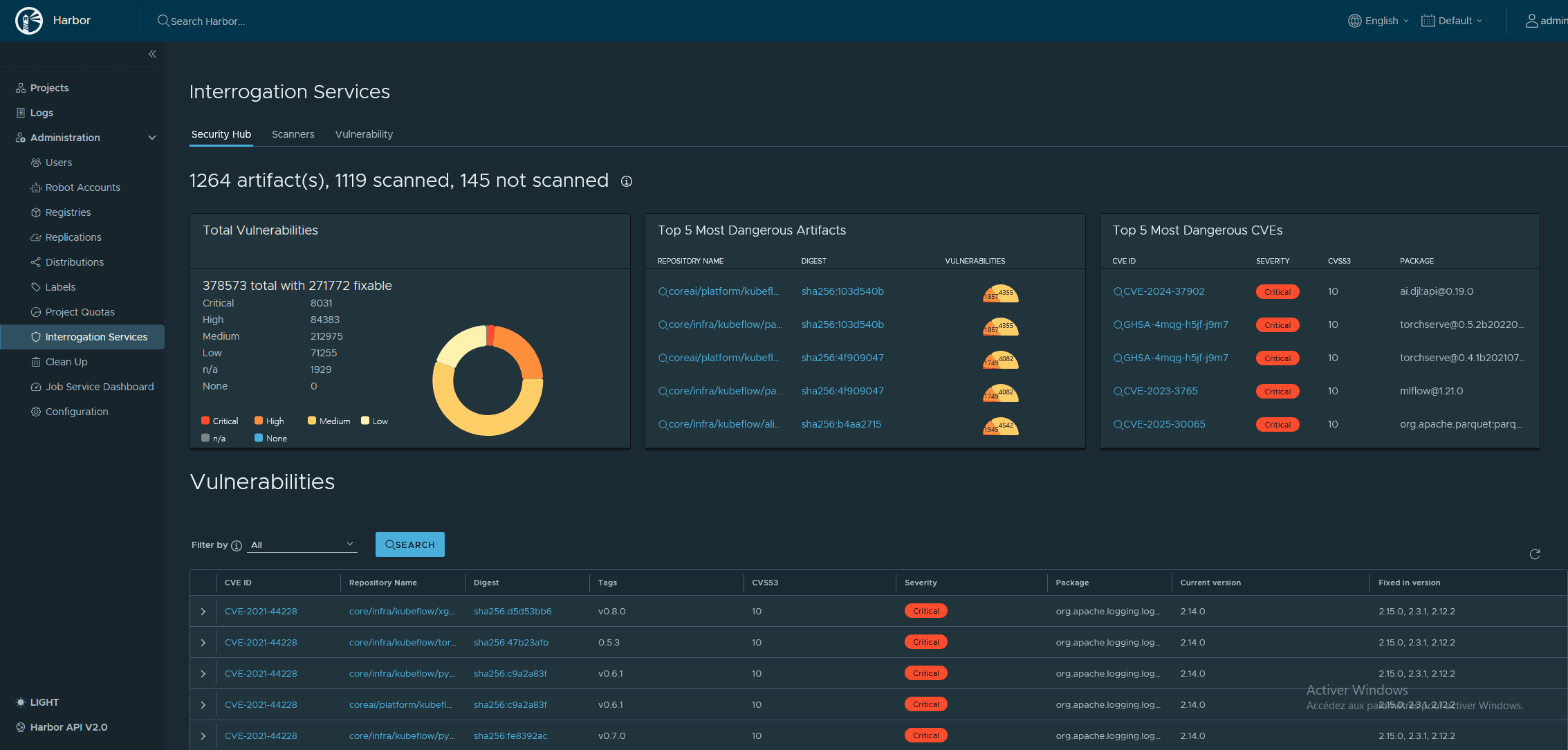
Or with the API :
if [ "$project_id" != "" ];then
	logger "Project core-public is set to public and auto-scan" YELLOW
	curl -k -s -u "${login_harbor}:${password_harbor}" -X PUT -H "Content-Type: application/json"  "$url_api_harbor/projects/${project_id}" -d '{ "metadata": {"public": "true","auto_scan": "true"}}'
	test_member=$(curl -k -s -u "${login_harbor}:${password_harbor}" -X GET -H "Content-Type: application/json"  "$url_api_harbor/projects/${project_id}/members" | jq '.[]  | select(.entity_id == '${user_id}')' | wc -l)
	if [ "${test_member}" == "0" ];then
		logger "User ${user_login_cicd} is not member of core-public : add it" CYAN
		curl -k -s -u "${login_harbor}:${password_harbor}" -X POST -H "Content-Type: application/json"  "$url_api_harbor/projects/${project_id}/members" -d '{"role_id": 4,"member_user": {"user_id":'${user_id}'}}'
	else
		logger "User is already member of core-public" CYAN
	fi
else
	logger "Error when retrieving "core-public" project" RED
	exit 1
fi
Charts Repository
Since version 1.6.0 Harbor can also be used as a repository for Helm charts.
To push a chart in the registry, execute the following command :
helm push chart_application.tgz https://$url_harbor/$project_name/chart_application.tgz