Administration and operations
Manage tenant lifecycle and find the controls used to operate BullSequana AI.
BullSequana AI separates platform-wide tenant lifecycle, tenant-specific administration, infrastructure operation, and service ownership. The portal exposes tenant lifecycle and configuration through a dedicated Administration workspace.
In this section
Administration workspace
Users with the platform admin role can switch from Chat & Work to Administration through the workspace switcher.
| Scope | Available controls |
|---|---|
| Platform | tenant registry, tenant creation, lifecycle status, and deletion |
| Tenant | General, Access Control, Vector Store, Theme, Service Desk, Integrations, and Allowed Resource Profiles |
The Tenant to manage selector lists the Keycloak Organizations available to the signed-in administrator. Tenant-scoped navigation remains disabled until an organization is selected. Changing the tenant reloads the selected administration page with the new tenant context.
Infrastructure health and GitOps operations remain available through the platform's operational services and the corresponding deployment and Foundation documentation. They are not a separate section in the Administration sidebar.
Tenant registry
Open Administration → Tenants to inspect tenant lifecycle records. The registry supports:
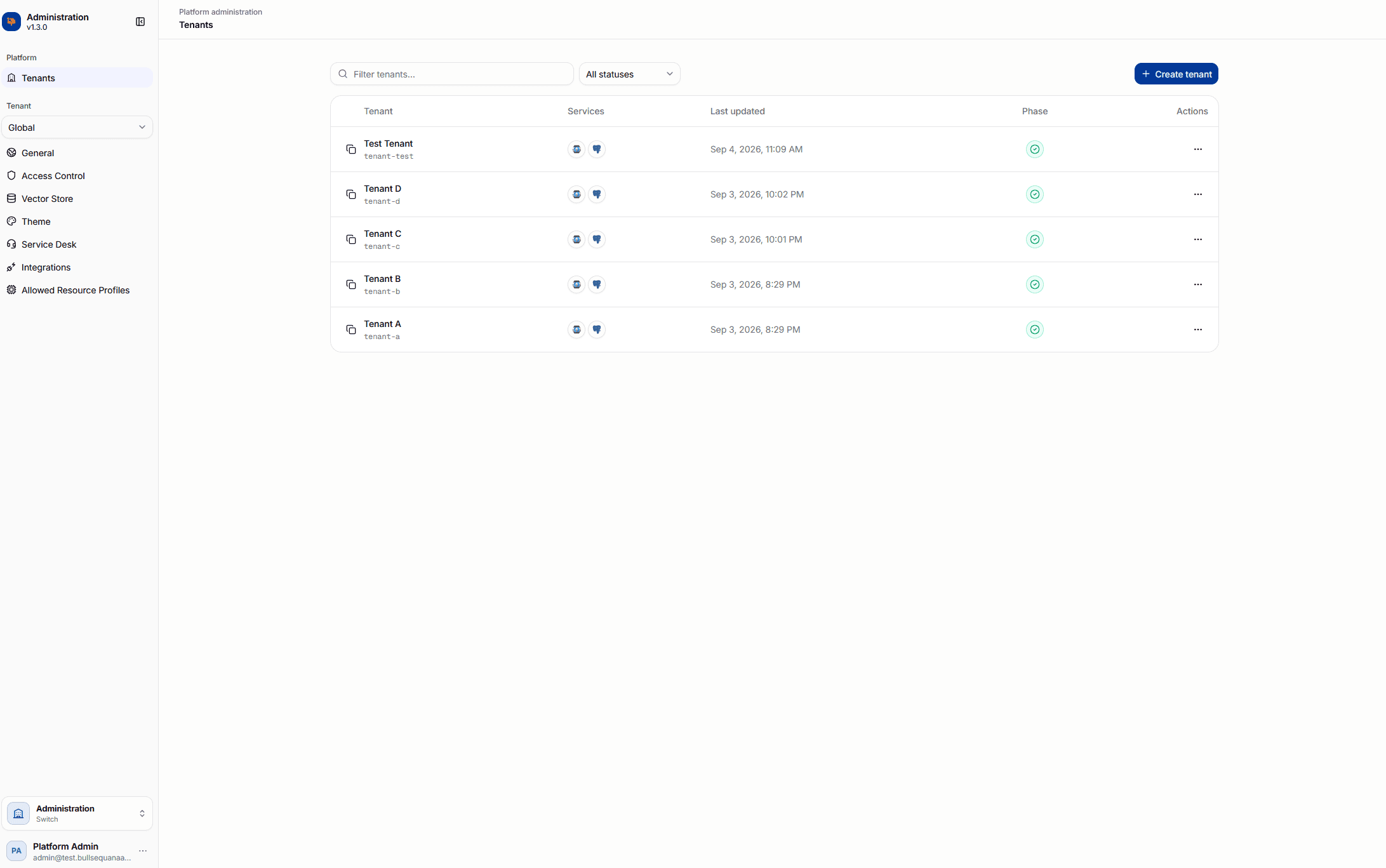
- search by display name, slug, or organization identifier
- filtering by lifecycle status
- service indicators for Keycloak and CloudNativePG
- the current lifecycle phase and last update time
- actions to open or delete a tenant
The registry refreshes while lifecycle operations are running.
Provision a tenant
Tenant creation is asynchronous. The portal submits a lifecycle request and continues to display progress while the platform reconciles the tenant.
- Open Administration → Tenants.
- Select Create tenant.
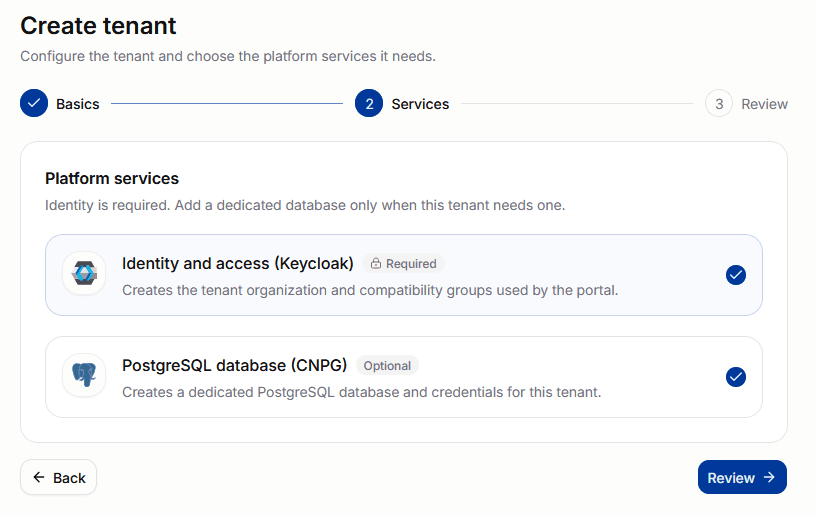
- Enter the immutable lowercase tenant slug and an optional display name.
- Keep Identity and access (Keycloak) enabled. It is required.
- Enable a dedicated CloudNativePG database when the tenant requires one.
- Review the configuration and select Start provisioning.
The provisioning page reports these stages:
- request accepted
- tenant namespace
- Keycloak identity
- optional database
- tenant ready
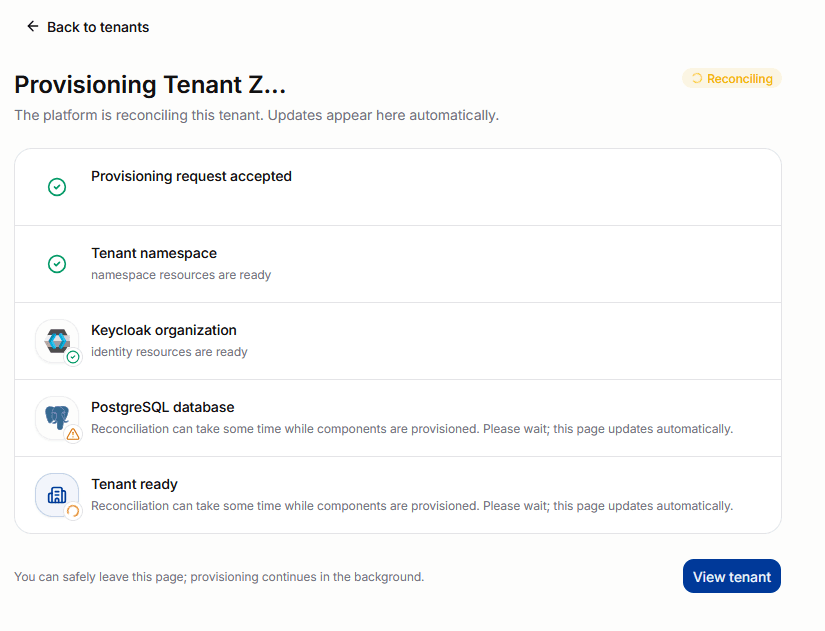
Provisioning continues after the administrator leaves the page.
Inspect tenant status
Select a tenant from the registry to inspect its lifecycle record.
| Tab | Information |
|---|---|
| Overview | lifecycle and organization identifiers, desired state, timestamps, and observed and desired generations |
| Services | readiness for the required Keycloak service and optional CloudNativePG database |
| Lifecycle Health | reported conditions, status, reason, and message |
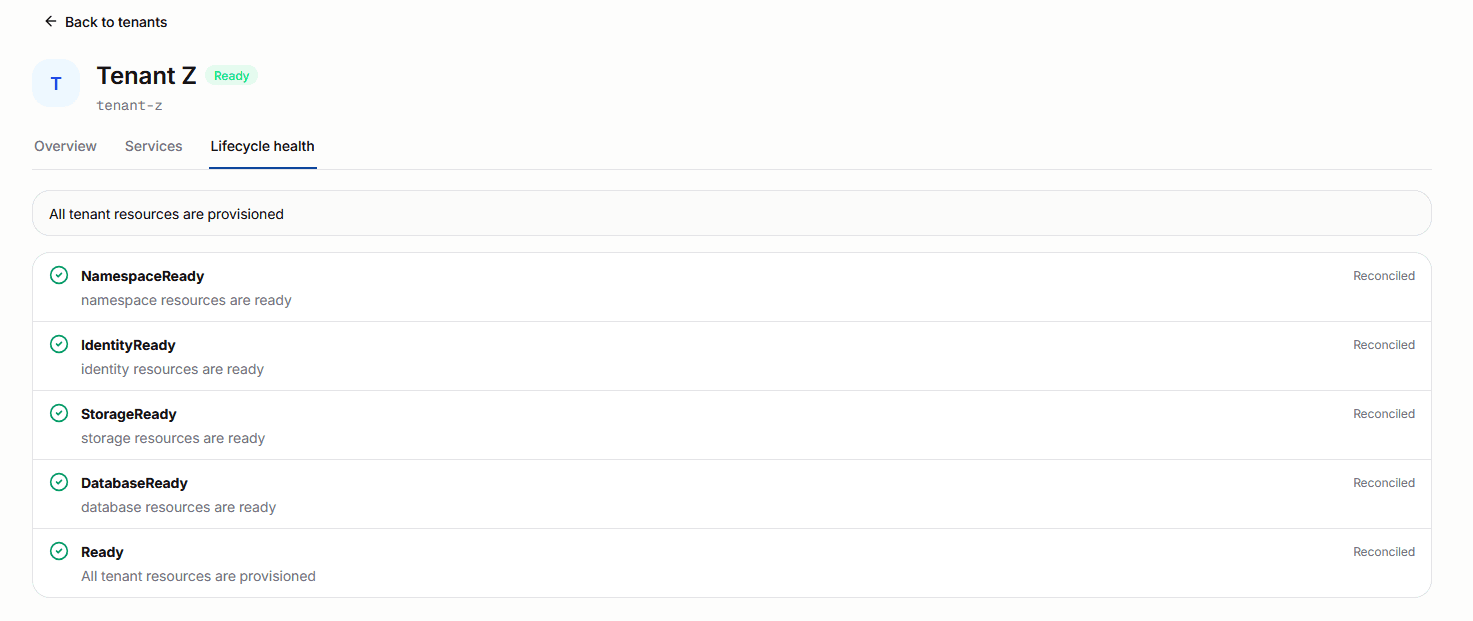
Use the lifecycle view when a tenant remains in Pending, Provisioning, Degraded, or Deleting.
Tenant lifecycle control plane
The BSQAI API stores the requested lifecycle state, Temporal executes the workflow, and the BSQAI Tenant Operator reconciles the PlatformTenant resource. The operator reports conditions and per-service status back through the API.
Keycloak creates the Organization that anchors the tenant identity. When CloudNativePG is requested, the workflow also creates the tenant database, owner, and credentials on the shared database cluster.
The tenant administration API is available under /v1/admin/tenants:
| Route | Purpose |
|---|---|
POST /v1/admin/tenants | Accept a tenant provisioning request |
GET /v1/admin/tenants | List lifecycle records |
GET /v1/admin/tenants/{lifecycle_id} | Read conditions and service status |
DELETE /v1/admin/tenants/{lifecycle_id} | Accept a tenant deletion request |
Create and delete return 202 Accepted. Poll the lifecycle record instead of treating the initial response as completion.
Delete a tenant
Deleting a tenant removes its managed platform resources and cannot be undone from the portal.
- Open the tenant's action menu in Administration → Tenants.
- Select Delete.
- Type the immutable tenant slug to confirm.
- Monitor the lifecycle record until deletion completes.
Back up or export tenant data that must be retained before requesting deletion.
Responsibility boundaries
| Role | Primary responsibility |
|---|---|
| Provider administrator | installation-wide settings, tenant lifecycle, hard resource limits, and initial administrator assignment |
| Tenant administrator | membership, delegated permissions, tenant configuration, integrations, and branding inside one tenant |
| Team owner | membership and resources delegated to one working group |
| Platform engineer | reliability, capacity, upgrades, recovery, and lifecycle automation |
| Service owner | onboarding, entitlements, adoption, consumption, and customer outcomes |
Use Security and compliance for control boundaries and multi-tenancy and tiered RBAC for Data workspace behavior.
Observe platform behavior
Foundation collects metrics, tenant-routed logs, traces, and operational events. Operators use these signals to inspect:
- tenant lifecycle and reconciliation failures
- request volume, latency, saturation, and errors
- model-serving and accelerator capacity
- database, object-storage, and block-storage health
- authentication and authorization failures
- tenant-scoped activity and durable audit events
Start with Observability and audit, Grafana, and Troubleshooting.
Upgrade and recover
Use the release notes to select the deployment path before changing a cluster. Modified environments require an explicit compatibility review and may require the manual GitOps migration.
See Upgrade and release process and PostgreSQL backup and disaster recovery.