Connect an MCP client to the Gateway
Point a coding agent or a desktop MCP client at an MCP Server's Gateway URL.
Any MCP client that speaks Streamable HTTP can call an MCP Server through the MCP Gateway. Coding agents, desktop assistants, and scripts all use the same address and the same authentication.
The Gateway publishes one URL per MCP Server. There is no merged endpoint, so a client that needs three servers gets three entries.
Before you start
Link your credential to the server first. Until you do, the Gateway refuses every call to it. See Link your credential to an MCP Server.
Create a BSQAI API key under Settings → API Keys in the Portal. A key is more practical than a JWT for a tool configuration that has to keep working. The full secret is shown once and looks like sk-bsq-v1-....
Get the Gateway URL
Open the server in the Portal and find the MCP Gateway URL card. Select Copy.
The URL has this shape:
https://mcp-gateway.<platform-domain>/servers/<server-id>/mcp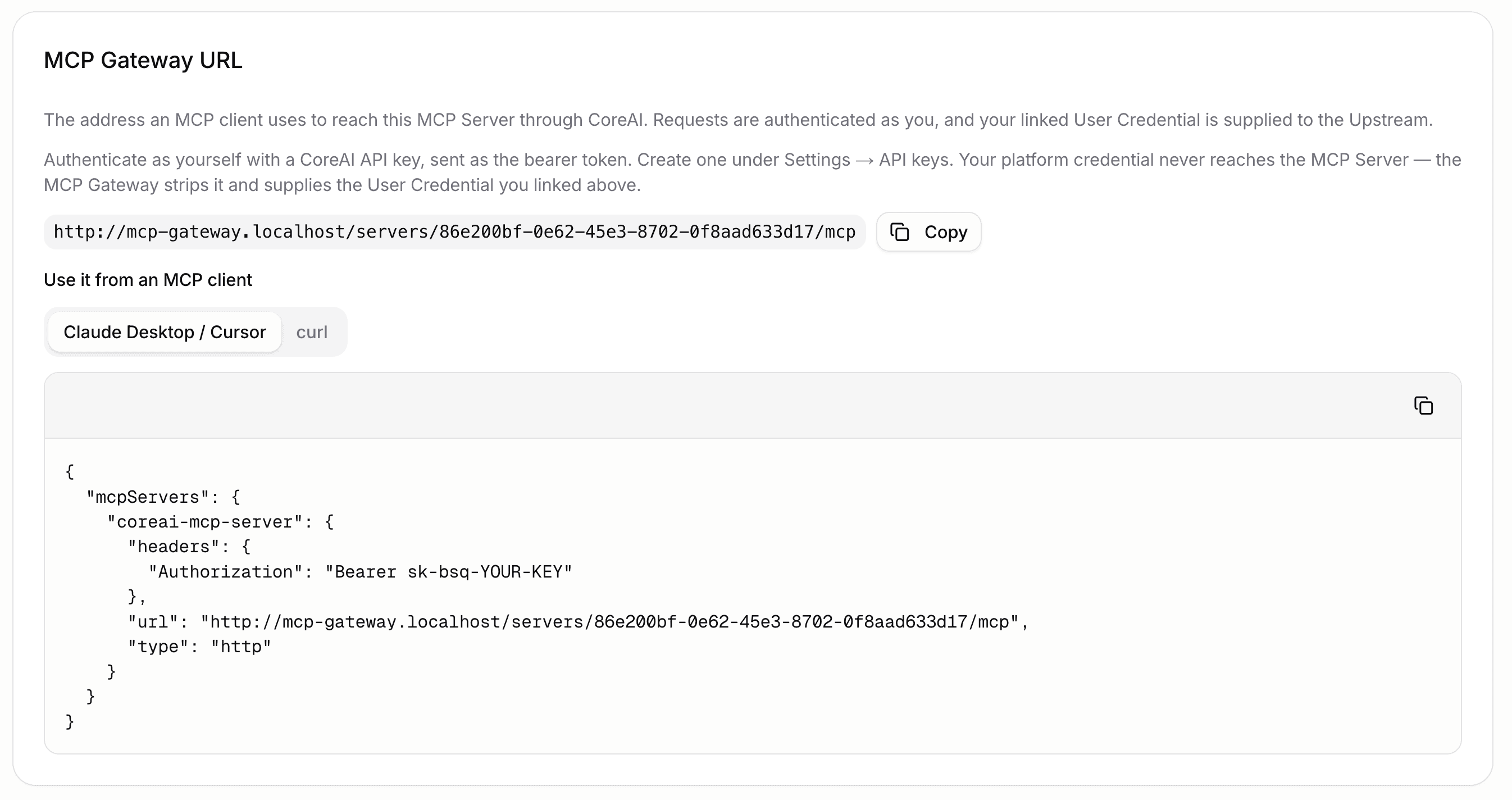
The same value is on gateway_url in the API response for the server. It is empty when the deployment has not published a Gateway address, and the Portal says so rather than showing a URL that resolves nowhere. A Platform Admin sets that address as part of the deployment.
The Gateway address is not the same as the BSQAI API address. The Gateway runs as its own service so that long-lived MCP sessions do not compete with chat traffic.
Configure a client
Most MCP clients read a JSON block of this shape. The Portal generates it for you with the URL already filled in.
{
  "mcpServers": {
    "bsqai-mcp-server": {
      "type": "http",
      "url": "https://mcp-gateway.<platform-domain>/servers/<server-id>/mcp",
      "headers": {
        "Authorization": "Bearer sk-bsq-v1-..."
      }
    }
  }
}
Three things matter, whichever client you use.
- The transport is Streamable HTTP, written
"type": "http"in most clients. The Gateway does not serve stdio or the deprecated SSE transport. - The API key goes in the
Authorizationheader as a bearer token. - Each MCP Server needs its own entry, under its own name.
Where that block lives differs per client. Claude Desktop and Cursor read it from their own settings file. Coding agents that support MCP read an equivalent file in the project or the user configuration directory. Check the client's own documentation for the path.
For connecting a coding agent to platform models rather than to tools, see Developer Tools.
Check the connection
export GATEWAY_URL="https://mcp-gateway.<platform-domain>/servers/<server-id>/mcp"
export BSQAI_TOKEN=sk-bsq-v1-...

curl -X POST "$GATEWAY_URL" \
  -H "Authorization: Bearer $BSQAI_TOKEN" \
  -H "Content-Type: application/json" \
  -H "Accept: application/json, text/event-stream" \
  -d '{"jsonrpc":"2.0","id":1,"method":"tools/list"}'
The Accept header is required. Streamable HTTP refuses a request that does not accept both content types, so the command fails without it.
A successful reply lists the tools the server offers, already filtered by the tool allowlist. A tool an administrator has not permitted does not appear, and cannot be called by name.
What the Gateway does with your request
Your API key authenticates you to the platform and nothing more. The Gateway removes it from the request and puts your linked User Credential in its place before forwarding. Your platform credential never reaches the MCP Server or the system behind it.
The Gateway also confirms on every call that the server belongs to your organization and that you may still use it. A permission removed while a session is open takes effect on the next call.
When something fails
The Gateway answers in JSON-RPC rather than the platform's usual error envelope, because MCP clients parse nothing else. Most clients surface the message field.
| Message | Cause | What to do |
|---|---|---|
Unknown tool: <name> | The tool is outside the allowlist, or the server does not offer it | Ask a Platform Admin to permit it |
| No credential is linked | You have not linked this server | Link it in the Portal |
| The credential was refused | The upstream system rejected your credential | Link it again |
| The credential has expired | An OAuth link the platform could no longer renew | Link it again with OAuth |
| Access denied to MCP Server | The server does not exist, belongs to another organization, or you may not use it | Check the URL and your organization |
| The MCP Server could not be reached | The workload or remote endpoint did not answer | Check the server's status in the Portal |
A 401 from the Gateway carries a bearer challenge naming the specific credential problem. It is deliberately not a generic invalid-token response, because your platform key is fine and refreshing it would not help.