Review tenant usage
Read how a tenant uses models and the BSQAI API, by user, group, source, application, model and API key.
Administration → Analytics shows how the selected tenant uses models and the BSQAI API, per day and broken down by user, group, source, application, model and API key. Tenant administrators use it, and so do members who read usage on their behalf, such as a finance or team lead. The page shows activity metadata only, never prompts, responses or request bodies. Every member sees their own usage in My usage.
Before you begin
| Reader | Access |
|---|---|
| Tenant administrator | Reads the usage of every tenant they administer. |
| Delegated usage reader | A member whose custom role grants tenant.usage.read. Administration shows Analytics and Budgets as its only pages. |
| Platform administrator | Reads usage in the Global Organization only, through Global tenant administration. Never another tenant's users or API keys. |
tenant.usage.read covers the whole tenant: a reader sees every member and every API key in it. It cannot be limited to a group or a team. API keys cannot hold it.
BullSequana AI records usage from the time an installation runs a version that records it. Earlier usage is not backfilled.
Open Analytics
- Open the workspace switcher and choose Administration. A member who reads usage but does not administer a tenant goes straight to Analytics.
- Select the tenant in the tenant selector under Tenant in the sidebar.
- Select Analytics in the Tenant section of the sidebar.
Changing the tenant reloads the page, so figures and names from the previous tenant are never shown.
Choose the view and period
Analytics has these tabs:
| Tab | Shows |
|---|---|
| Overview | The period's headline figures, with the top users and models |
| Breakdown | Daily trends and the usage grouped by one dimension |
| BCU | The period's consumption in BCU |
| Served to others | What other tenants consumed from this tenant's models. In the Global Organization, this tab is Used by tenants, the Tenant BCU statement. |
| Data collection | In the Global Organization only: when collection started and where records are missing |
The period selector above the figures offers Today, Last 7 days, Last 30 days, This month, Last month and Custom range. Last 30 days is the default, except on the Global Organization's Used by tenants tab, which opens on Last month. The chosen period applies to every tab. A custom range takes a first and a last day.
- Days are Europe/London calendar days, both ends included.
- A period covers at most 366 days.
- The page address keeps the period, so a refreshed page or a shared link shows the same days.
Refresh, at the right of the period selector, reads the figures again. Next to the period selector, the page shows the days the period covers.
The monthly allowance and caps are on their own page, Administration → Budgets, directly below Analytics in the sidebar. Every reader of Analytics can open it. It always covers the current Europe/London calendar month, whatever period Analytics shows. See Manage monthly BCU allowances and caps.
Read the overview
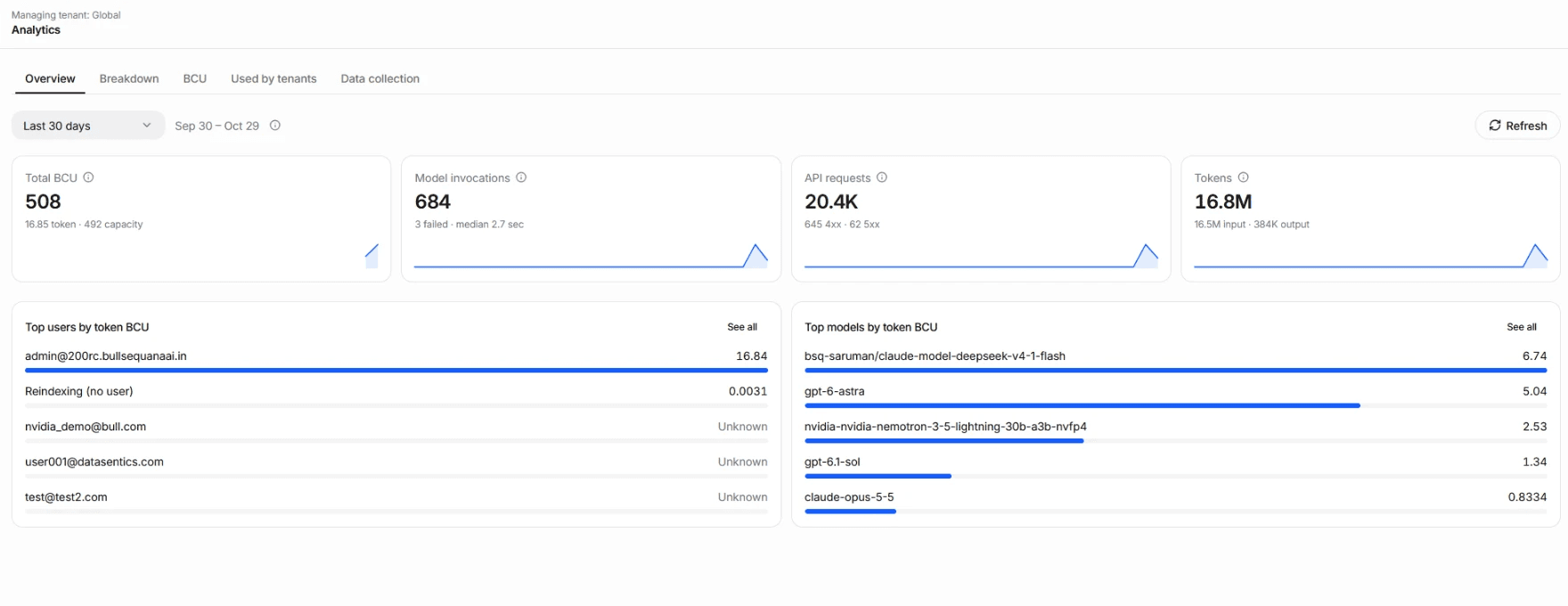
The Overview tab shows the period's totals as tiles, each with a daily sparkline:
- Total BCU, split into token and capacity BCU. A tenant without recorded capacity shows Token BCU instead.
- Model invocations, with the number that failed and the median latency.
- API requests, with the client errors (4xx) and server errors (5xx).
- Tokens, the input and output tokens.
Below the tiles, Top users by token BCU and Top models by token BCU list the period's five largest consumers. A user or model whose calls reported no tokens shows Unknown. See all opens the full list on the Breakdown tab.
Requests, invocations and tokens are separate measures, and the page never adds them into one figure.
| Measure | What it counts |
|---|---|
| Model invocations | Requests the platform sent to a model server, by outcome: completed, failed, incomplete (stopped by a length or content limit) and cancelled. One API request can make several, such as a tool loop or a retry. |
| API requests | HTTP requests to the BSQAI API whose caller belongs to the tenant, by response status: succeeded, client errors (4xx) and server errors (5xx). Portal chat and API-key calls both count. |
| Median latency | The median duration of model invocations, with the 95th percentile below it. |
| Input, output and cached tokens | Token counts as the model servers reported them. Output tokens include reasoning tokens. Cached tokens are input tokens read from a model server's prompt cache. |
A token figure reads Unknown, never zero, when invocations were made but none of them reported tokens. A period without any model call shows 0. When some invocations reported no tokens, the tile's hint says how many. Predictive models report no tokens.
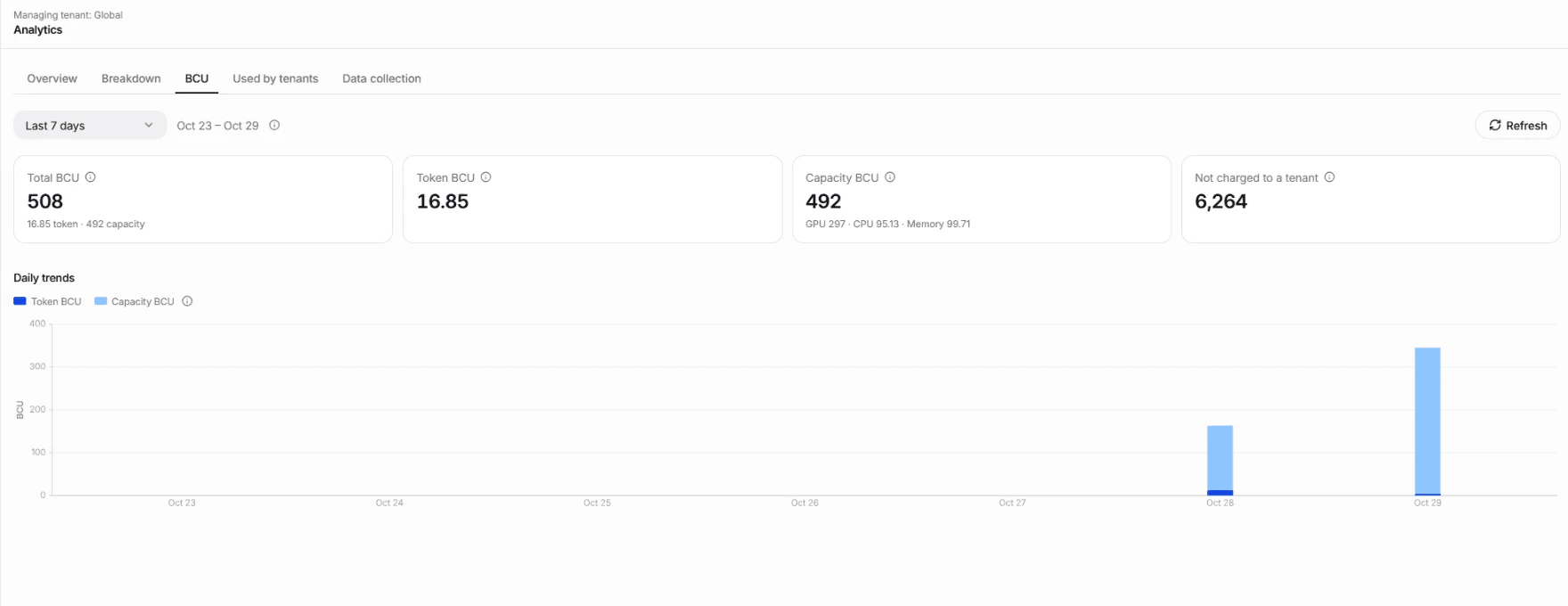
The BCU tab shows Total BCU with its token and capacity parts, Token BCU, and Capacity BCU split into GPU, CPU and memory. In the Global Organization it also shows Not charged to a tenant: capacity no tenant pays for, such as idle nodes and the platform's own services, which Total BCU does not include. Daily trends shows token and capacity BCU per day. A tenant without recorded capacity sees only Token BCU. What each balance counts explains token and capacity BCU.
Check freshness and coverage
Point at Refresh to see Up to date as of: the time by which every running usage collector had stored its records. Screen readers announce it with the button. When no collector has reported in the last minute, the same place says that the latest usage may not be included yet.
For the Global organization, a Data collection view shows, per period, when collection started and where records are missing. Other organizations' Analytics pages show no coverage status: a tenant administrator who suspects missing records asks a Global administrator to check that view.
A period without usage shows No usage in this period.
Break usage down
The Breakdown tab opens with Daily trends: model invocations by outcome, API requests by status, input, output and cached tokens, and the median and 95th-percentile latency, per day. A day whose calls reported no tokens is a gap in the token chart, not zero.
Below the trends, the tab groups the period's usage by one dimension at a time. Each view lists up to 100 groups, with the most invocations first, and says when more exist.
| View | Groups | Notes |
|---|---|---|
| Users | Each member, by email or username | A call made with an API key counts for the key's owner, who is accountable for it but not confirmed as the caller. Expand a user to split Portal, API-key and workload use. Background reindexing appears as Reindexing (no user), and someone no longer in the tenant as Former or unknown member. |
| Sources | Portal, API key, Workload and Other signed-in client | Taken from the caller's verified credential, never from a header it sends. |
| Applications | Platform applications: Portal, Deep Research, Library ingestion, Document intelligence and Reindexing. Reported applications: names the calling client sends. | Reported names are not verified. Calls that name no application appear as Not reported. |
| Models | The model name callers use | API requests are not counted per model. |
| Groups | The team (group) each API key was bound to when it was created | A key's calls stay under that group after the key is deleted. Portal and workload calls have no group by design and appear together as No group, as do keys bound to no group: this is not missing data. A group that no longer exists appears as Deleted group. |
| API keys | The key's name | Calls without a key, such as Portal chat, appear together as Without an API key. A deleted key appears as Deleted key. Expand a key to see the applications it was used from. |
| Global vs private | Global models and Private models | Global models are available platform-wide from the tenant that owns them. Private models belong to this tenant. |
Users and Groups count the same calls from two angles. A member in several groups counts once per call, under the group of the key that made it, so their total is the same in both views. Never add the two views together.
A client is listed by name when it is Claude Code or OpenCode, or when it sends an X-Title or X-OpenRouter-Title header, an HTTP-Referer header, or a User-Agent header. Several tools can share one API key: expanding the key shows each tool's share.
Usage served to other tenants
The Served to others tab shows Usage served to other tenants: per model, what other tenants consumed from the models this tenant publishes. Their names, users and API keys are not shown.
The Global Organization never sees another tenant's users or API keys.
Tenant BCU statement
In the Global Organization, Used by tenants is the Tenant BCU statement: what each tenant consumed in the period, in BCU. It is showback, not an invoice: BCU rates are estimates until reference measurements confirm them. It opens on last month unless another period is chosen. Every other organization sees its own BCU only, and never another tenant's.
| Row | Token BCU | Capacity BCU | Total BCU |
|---|---|---|---|
| Each tenant, by name | Its calls to the Global Organization's models | The GPU, CPU and memory its running pods held, idle time included | Token plus capacity BCU |
| Global Organization | – | Its own capacity: the platform's model serving and its own workloads | – |
| Not charged to a tenant | – | Capacity no tenant pays for: idle nodes and the platform's own services | – |
| Cluster capacity | – | All capacity recorded in the period | – |
- Detail: expand a tenant to see its token BCU per model, and its capacity BCU per GPU class, CPU and memory. The detail adds up to the tenant's figures.
- Shared GPUs: a tenant's GPU capacity covers the share of each shared card its pods hold, as What each balance counts describes.
- Reconciliation: the tenants' capacity, the Global Organization's own and the capacity no tenant pays for add up to Cluster capacity.
- Not in the statement: calls to a tenant's own models. The tenant's capacity BCU covers the pods that serve them. A tenant deleted since appears as Deleted tenant.
- Unknown, never zero: a figure reads Unknown when nothing was recorded for it: capacity for a period without any recorded interval, or token BCU when the tenant's calls should have reported tokens and none did. Calls without token counts are counted under the figure. Predictive models report no tokens by design: their calls add no token BCU and are not counted as missing, so a tenant with only predictive calls, or no calls, has a token BCU of 0.
- Usage records incomplete marks a period with no usage records for part of its time.
- Capacity recorded from a day, or a count of missing intervals, marks capacity that was not recorded for all of the period.
- The figures then cover only what was recorded. Data collection shows the windows.
- Stored records: the statement comes from stored records, so metrics that expire and a later rate change never alter it. A closed month changes only when records for it are stored late: a capacity interval that could not be read is read again for up to seven days, and usage buffered in a collector is stored when it is flushed. Before treating a month as final, check that the statement shows no incomplete-record warning.
- Download CSV: saves the statement on screen: the period, every tenant with its figures, its per-model and per-resource lines, and the reconciliation rows, with six decimals. An unknown figure is an empty cell.
Read usage through the API
The page reads the BSQAI API's usage summaries. Send the tenant in X-Tenant-Id with a signed-in user's token.
| Route | Required permission | Returns |
|---|---|---|
GET /v1/usage/tenant | tenant.usage.read | The selected tenant's usage. |
GET /v1/usage/served | tenant.usage.read | What other tenants consumed from the tenant's models. group_by=tenant and tenant_id are accepted only in the Global Organization. |
GET /v1/usage/statement | tenant.usage.read, in the Global Organization only | The tenant BCU statement: each tenant's token, capacity and total BCU, with Global's own, unattributed and cluster capacity. Any other organization receives 403 permission_denied. |
GET /v1/usage/me | tenant.read | The caller's own usage in the selected tenant, including calls made with their API keys. |
Every route takes first_day and last_day, as YYYY-MM-DD Europe/London days, both included. On /tenant and /me, group_by adds a breakdown by user, source, application, model, api_key, endpoint_scope or funding_group; /me has no user breakdown. /served is broken down by model, or by tenant in the Global Organization. In a funding_group breakdown, each group's label is the group's current name, null when the group was deleted, and the group with a null key holds the calls no group funds: Portal and workload calls, and keys bound to no group. limit sets the number of groups, from 1 to 1000, with 100 as the default. /tenant filters by user_id, source, application, model, api_key_id and endpoint_scope; /me takes the same filters except user_id.
export BSQAI_API_URL=https://<api-host>
export TENANT_ID=<tenant-organization-id>
export ACCESS_TOKEN=<access-token>
curl -s "$BSQAI_API_URL/v1/usage/tenant?first_day=2026-10-01&last_day=2026-10-21&group_by=user" \
  -H "Authorization: Bearer $ACCESS_TOKEN" \
  -H "X-Tenant-Id: $TENANT_ID"
The answer holds totals, one entry per day in daily, the breakdown groups and coverage, with complete, fresh_as_of and each incomplete window and its reason. A token sum is null when nothing reported it.
tokens.bcu gives the input and output tokens in BCU, at the rate each record was stored with: one BCU per million tokens on the default rate card. A later rate change does not alter usage already recorded. Token BCU counts for the consuming tenant and user, whether the model is Global or private; in /served it shows what other tenants consumed, not a charge to the owner. It is null when no invocation reported tokens, and it has six decimals.
/statement takes only first_day and last_day. Each entry in tenants holds tenant_id, label (null for a deleted tenant), tokens (bcu, invocations and unreported_invocations), capacity (bcu, gpu, cpu, memory and gpu_classes), total_bcu and models. global_capacity, unattributed_capacity and cluster_capacity hold the reconciliation rows. A BCU figure is null when it is unknown, never 0: capacity when no interval was recorded, tokens.bcu when calls that report tokens were made and none did, and total_bcu when either is null. Predictive calls carry no tokens: they are not counted in unreported_invocations, and a tenant with only predictive calls, or none, has tokens.bcu 0. Each figure is rounded to six decimals before it is summed, so detail and rows add up exactly. coverage and capacity_coverage are those of /tenant.
| Error | Cause |
|---|---|
400 usage_period_invalid | The last day is before the first, or the period exceeds 366 days. param names the field. |
400 usage_breakdown_invalid | The breakdown or limit is not available for this route or tenant. |
503 usage_unavailable | The usage records cannot be read right now, or, for a funding_group breakdown, the tenant's group names cannot. Retry shortly. A group is never shown as deleted because its name could not be read. |
A personal API key reaches /v1/usage/me when its owner granted it tenant.read. No API key reaches /v1/usage/tenant, /v1/usage/served or /v1/usage/statement.