Manage monthly BCU allowances and caps
Set a tenant's soft monthly BCU allowance and the user and group caps that refuse new model calls once they are reached.
BullSequana AI compares each tenant's consumption in BCU with monthly limits of two kinds:
- A platform administrator sets a tenant's allowance. It is soft: when it is reached, service and metering go on, and the overage is shown.
- A tenant administrator sets caps on members and on the groups that fund API keys. Once a cap is reached, new model requests that it covers are refused.
This page is for tenant administrators and for members who manage budgets on their behalf, such as a finance or team lead. Platform administrators use it to set allowances. Developers find how the BSQAI API answers a refused request in What a refused call looks like. Every member sees their own cap in My usage.
Before you begin
| Task | Who | Permission |
|---|---|---|
| Read the tenant's allowance, caps and balances | Tenant administrator, or a member whose custom role grants it | tenant.usage.read |
| Set and remove user and group caps | Tenant administrator, or a member whose custom role grants it | tenant.usage.budget_manage, which implies tenant.usage.read |
| Read your own cap and the caps of the groups funding your API keys | Every member | tenant.read |
| Read every tenant's allowance and total BCU | Platform administrator | platform.tenant.list |
| Set and remove a tenant's allowance | Platform administrator | platform.tenant.update |
API keys cannot hold tenant.usage.read, tenant.usage.budget_manage or the platform permissions, so no API key sets a limit or reads another member's balance. Platform administrators see one total per tenant, never its members, API keys, groups or models.
Allowances and caps
| Limit | Set by | Counts | When it is reached |
|---|---|---|---|
| Tenant allowance | Platform administrator | Token BCU of every call recorded for the tenant, plus the capacity BCU its pods held, idle time included | Nothing is refused. Tenant and platform administrators see the overage. |
| User cap | Holder of tenant.usage.budget_manage | Token BCU of every call attributed to the member in the tenant: the Portal, all their API keys, and background work run for them | New requests by the member are refused. |
| Group cap | Holder of tenant.usage.budget_manage | Token BCU of the calls made with API keys bound to the group | New requests with those keys are refused. |
An API key is bound to the group chosen as its Team when the key was created. A call with the key counts against the key owner's cap and against that group's cap, never against the owner's other groups. Portal calls and background work carry no group. Deleting a key or creating a new one resets nothing: each record keeps the group its key was bound to at the time of the call.
Each limit stands on its own. A level without a limit adds no check, while the other limits and the usual permissions still apply. Caps do not draw on the allowance, and the allowance never refuses a call.
A cap of 0 is a limit, not an absence of one: it refuses every new request at once, even with nothing consumed. An allowance of 0 is always reached, and still refuses nothing.
Monthly periods
Every limit applies to the current Europe/London calendar month. A month runs from 00:00 on its first day, inclusive, to 00:00 on the first day of the next month, exclusive, whether that midnight falls in GMT or BST.
- A new month starts a fresh total. Earlier months' records stay in the usage history.
- There is no manual reset. Raising a cap makes room; lowering it below what was consumed refuses new requests without stopping running ones.
- A limit applies from the next request after it is saved or removed.
The BCU Spend Grafana dashboard counts UTC months and measures differently, so its totals do not match these balances.
What each balance counts
Token BCU is the input and output tokens of each call, at the rate the call was recorded with: one BCU per million tokens on the default rate card. A call counts for the consuming tenant and member, whether the model belongs to the Global Organization, to the tenant or to another tenant that publishes it. A later rate change does not alter what was recorded.
Capacity BCU is the GPU, CPU and memory the tenant's running pods held, idle time included, recorded in closed intervals. It counts only towards the tenant allowance: members and groups have no capacity. Pods that serve the tenant's own models count for the tenant, also when other tenants call those models. The platform's model-serving pods count for the Global Organization. The latest capacity is included once its interval is recorded: capacity_fresh_as_of gives the end of the newest recorded interval.
On a shared GPU, a pod counts for the share of the card it holds, at the card's GPU class rate:
- Fraction: the fraction it requests, such as 0.25 of the card.
- GPU memory: the memory it requests, divided by the card's memory.
- Time slice: one slice of the card's configured replicas, such as a quarter of the card with four replicas.
The pod KAI Scheduler runs to hold a fractioned GPU counts for no one. The part of a shared card that no pod holds is capacity no tenant pays for.
The same records feed Review tenant usage and Review your usage, so a balance matches the BCU those pages show for the month.
Unknown measurements
BullSequana AI never counts an unknown measurement as zero.
- Calls without token counts: a call whose model server reported no tokens adds no BCU, so it does not bring its balance closer to a cap. Each balance counts these calls separately in
unreported_invocations, and the Portal shows them as calls without token counts, not in the BCU. Calls to predictive models are the exception: they never carry tokens, so they are neither in the BCU nor inunreported_invocations. Their cost is the capacity of the deployment that serves them. - Capacity not recorded yet:
capacity_bcuisnulluntil an interval of the month is recorded, and the Portal shows not recorded yet. The allowance balance then holds token BCU only.
Set a tenant allowance
A platform administrator sets the allowance on the tenant's Quotas tab, next to its GPU allocation and compute quota.
- Open Administration → Tenants and select the tenant.
- Open Quotas.
- In Monthly BCU allowance, enter Allowance (BCU per month). Leave it empty for no allowance. 0 is an allowance that is always reached.
- Select Save allowance.
The card shows the tenant's consumption against the allowance, and its state. A tenant whose organization is not provisioned yet cannot have an allowance.
Administration → Tenants lists, above the registry, the tenants that are over their allowance this month. Open a tenant's Quotas tab to see or change its allowance.
Set user and group caps
- Open the workspace switcher, choose Administration, and select the tenant in the tenant selector under Tenant in the sidebar. The page header then reads Managing tenant: and the tenant.
- Select Budgets in the Tenant section of the sidebar, directly below Analytics.
- Select Add cap in the page header.
- In User or group, choose the member or group.
- Enter Monthly cap (BCU) and select Save cap.
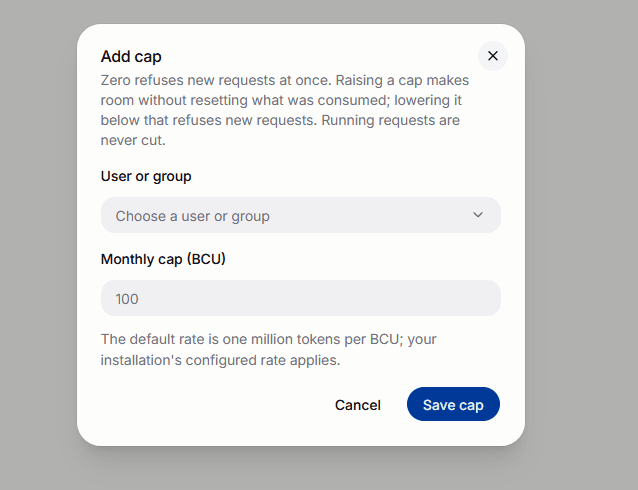
To change or remove a cap, select the edit button on its row. Enter a new value and select Save cap, or select Remove cap.
Add cap offers the tenant's members and the groups that ordinary group controls can edit, except those that already have a cap. Protected administrator groups cannot have a cap. Members who hold tenant.usage.read without tenant.usage.budget_manage see the Budgets page without Add cap or edit buttons.
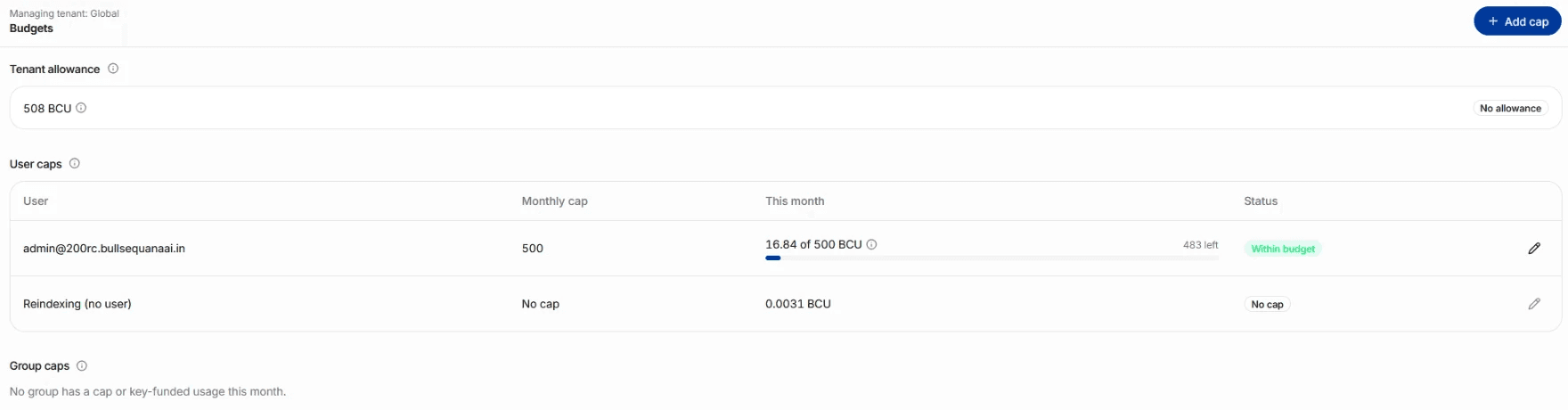
The Budgets page shows:
- Tenant allowance: the tenant's consumption against its allowance, with its status, such as No allowance; the info icon next to the figure splits it into token and capacity BCU;
- User caps: every member with a cap or with usage this month. Background reindexing appears as Reindexing (no user) and cannot have a cap;
- Group caps: every group with a cap or with key-funded usage this month.
A group deleted since appears as Deleted group, with the start of its ID.
Set limits through the API
Send the tenant in X-Tenant-Id with a signed-in user's token. /v1/usage/budgets/me also accepts a personal API key that its owner granted tenant.read. Allowance routes are platform routes and take the tenant in their path instead.
| Route | Required permission | Does |
|---|---|---|
GET /v1/usage/budgets | tenant.usage.read | Returns the month, the selected tenant's allowance balance with its token_bcu, capacity_bcu and capacity_fresh_as_of, and a balance for every member and group with a cap or usage this month. |
GET /v1/usage/budgets/me | tenant.read | Returns the caller's own cap, and the caps of the groups funding their API keys. |
PUT /v1/usage/budgets/users/{user_id} | tenant.usage.budget_manage | Sets a member's cap. |
DELETE /v1/usage/budgets/users/{user_id} | tenant.usage.budget_manage | Removes a member's cap. |
PUT /v1/usage/budgets/groups/{group_id} | tenant.usage.budget_manage | Sets a group's cap. |
DELETE /v1/usage/budgets/groups/{group_id} | tenant.usage.budget_manage | Removes a group's cap. |
GET /v1/usage/allowances | platform.tenant.list | Returns every tenant's allowance balance with its token and capacity BCU. |
PUT /v1/usage/allowances/{tenant_id} | platform.tenant.update | Sets a tenant's allowance. |
DELETE /v1/usage/allowances/{tenant_id} | platform.tenant.update | Removes a tenant's allowance. |
user_id, group_id and tenant_id are the Keycloak IDs of the member, the group and the tenant organization. PUT takes the limit in monthly_bcu, as a number or a decimal string.
export BSQAI_API_URL=https://<api-host>
export TENANT_ID=<tenant-organization-id>
export ACCESS_TOKEN=<access-token>

curl -s -X PUT "$BSQAI_API_URL/v1/usage/budgets/users/<user-id>" \
  -H "Authorization: Bearer $ACCESS_TOKEN" \
  -H "X-Tenant-Id: $TENANT_ID" \
  -H "Content-Type: application/json" \
  -d '{"monthly_bcu": 100}'

curl -s -X DELETE "$BSQAI_API_URL/v1/usage/budgets/groups/<group-id>" \
  -H "Authorization: Bearer $ACCESS_TOKEN" \
  -H "X-Tenant-Id: $TENANT_ID"

curl -s -X PUT "$BSQAI_API_URL/v1/usage/allowances/$TENANT_ID" \
  -H "Authorization: Bearer $ACCESS_TOKEN" \
  -H "Content-Type: application/json" \
  -d '{"monthly_bcu": 5000}'
PUT returns the holder's balance for the current month. The allowance PUT also returns the tenant's name, token_bcu, capacity_bcu and capacity_fresh_as_of. In GET answers, name is the group's or tenant's name, and null for a member or a deleted group.
{
  "holder": "user",
  "holder_id": "<user-id>",
  "name": null,
  "monthly_bcu": 100.0,
  "consumed_bcu": 42.5,
  "remaining_bcu": 57.5,
  "overage_bcu": 0.0,
  "state": "available",
  "unreported_invocations": 0
}
DELETE returns 204 No Content, also when no limit was set. GET /v1/usage/budgets and /v1/usage/budgets/me return month, with first_day, last_day and time_zone, next to the balances.
Validation
monthly_bcu is 0 or more, at most 999,999,999,999.999999, with at most six decimals. The Portal asks for the same: Enter 0 or more, with at most six decimals.
| Error | Cause |
|---|---|
422 | monthly_bcu is missing, negative, too large or has more than six decimals, or a group or tenant ID is not a UUID. |
403 | The caller lacks the route's permission. |
404 usage_budget_holder_not_found | The user is not a member of the selected tenant, the group is not one of its ordinary groups, or the tenant does not exist. param is user_id, group_id or tenant_id. |
503 usage_unavailable | The usage records cannot be read right now. Retry shortly. |
Remaining and overage
Every balance holds monthly_bcu, consumed_bcu, remaining_bcu, overage_bcu and state. Figures have six decimals.
remaining_bcuis what is left before the limit, and never below 0.overage_bcuis what was consumed above the limit, and never below 0.- Both are
nullwhen no limit is set at that level.
state | Portal | Meaning |
|---|---|---|
unset | No cap or No allowance | No limit at this level. |
available | Within budget | Below the limit. |
reached | Cap reached | A user or group cap with consumption at or above it. New requests are refused. |
blocked | Blocked | A user or group cap of 0. New requests are refused, even with nothing consumed. |
allowance_reached | Over allowance | A tenant at or above its allowance, an allowance of 0 included. Calls go on. |
Caps are enforced on a best-effort basis, not as a hard guarantee. A cap is checked when a request starts, against the BCU recorded so far. Calls that a request makes after it was admitted, concurrent requests, and calls not yet recorded can take consumption past a cap. That overshoot stays in overage_bcu and still counts.
What a refused call looks like
Every model request through the BSQAI API is checked once, before its first model call is forwarded:
- A Portal request, or a request with a signed-in user's token, checks the member's cap.
- A request with an API key checks the key owner's cap and the cap of the group the key is bound to.
The caller comes from the verified credential, never from a header the client sends, so neither a client-reported source nor a new key gets around a cap.
If a cap that applies is reached or blocked, the request is refused with 429 and the header x-should-retry: false. The header tells clients not to retry, since the request would fail again. param names the cap: user_cap for the member's, group_cap for the API key's group.
{
  "error": {
    "type": "usage_error",
    "code": "usage_cap_reached",
    "detail": "Your monthly BCU cap is reached. A tenant administrator can raise it.",
    "param": "user_cap",
    "request_id": "<request-id>"
  }
}
For a group cap, detail reads This API key's funding group's monthly BCU cap is reached. A tenant administrator can raise it. The Anthropic Messages API returns the same status and header as a rate_limit_error:
{
  "type": "error",
  "error": {
    "type": "rate_limit_error",
    "message": "Your monthly BCU cap is reached. A tenant administrator can raise it."
  }
}
A refused request is not a rate limit: waiting does not help until the next month starts or a tenant administrator raises or removes the cap. Clients tell it apart from other 429 answers by code, or by x-should-retry: false.
The check never cuts a request it admitted:
- Further calls of an admitted request, such as tool loops, retries and title or compaction calls, are not refused, and a running stream finishes. Their usage is recorded and counted as usual.
- Background work run for a member, such as the steps of a deep research run and document ingestion, counts against the member's cap but is not checked, since no new request admits it.
- An embedding reindex, including the files it parses again, the figures it extracts, the pictures it describes, and the files it processes again in full after it completes, counts toward the tenant's consumption only, not toward any member's cap. A file uploaded during a reindex is embedded twice. The uploader's cap pays for the first embedding, and the second counts toward the tenant only.
- A tenant over its allowance is never refused.
See over-limit states in the Portal
BullSequana AI shows over-limit states as Portal banners. It sends no email or other notification.
| Banner | Shown to | Where |
|---|---|---|
| Your monthly BCU cap is reached, or is zero | The member whose cap it is | At the top of every page of the main workspace, such as chat, Files, API keys and My usage, with a link to View my budget |
| Over the monthly BCU allowance | Members who read the tenant's usage (tenant.usage.read) | At the top of the tenant's Administration pages, with a link to View budgets, which opens the Budgets page |
| Tenants over the monthly BCU allowance | Platform administrators | Above the registry in Administration → Tenants, naming each tenant |
A reached group cap has no banner. It shows on the Budgets page, and in the Budget tab of My usage for each member whose key the group funds.
Verify a limit
- In Administration → Budgets, find the member or group. Monthly cap shows the cap, This month shows the consumption against it with what is left or over, and Status shows the state.
- As the member, open My usage → Budget. My cap shows the same figures, and Groups funding my API keys lists the groups of their keys.
- Through the API,
GET /v1/usage/budgetsreturns the holder with the samemonthly_bcu,consumed_bcuandstate. - To test enforcement, set a cap of 0 on a test member. A model request with that member's API key returns
429 usage_cap_reached, and their Portal shows the banner. Remove the cap: the next request is admitted.
For an allowance, the Monthly BCU allowance card on the tenant's Quotas tab and GET /v1/usage/allowances show the same balance, and the tenant appears in the Administration → Tenants banner once it is over.