Review your usage
See your own model and API usage in the active organization, across the Portal, your API keys and the tools you use them from.
My usage shows how much you use models and the BSQAI API in the active organization: in the Portal, through background work run for you, and through your API keys and the tools you call them from. Every member can open it. It shows your own usage only, never another member's. Its Budget tab shows your monthly BCU cap.
Open My usage
- Open the user menu at the bottom of the sidebar.
- Choose My usage, under API Keys.
The page shows your usage in the active organization. Changing the organization reloads it with your usage there.
Choose the view and period
My usage has three tabs: Overview, Breakdown, and Budget. On Overview and Breakdown, the period selector offers Today, Last 7 days, Last 30 days, This month, Last month and Custom range. Last 30 days is the default.
- Days are Europe/London calendar days, both ends included.
- A period covers at most 366 days.
- The page address keeps the period, so a refreshed page or a saved link shows the same days.
Refresh reads the figures again.
Read your figures
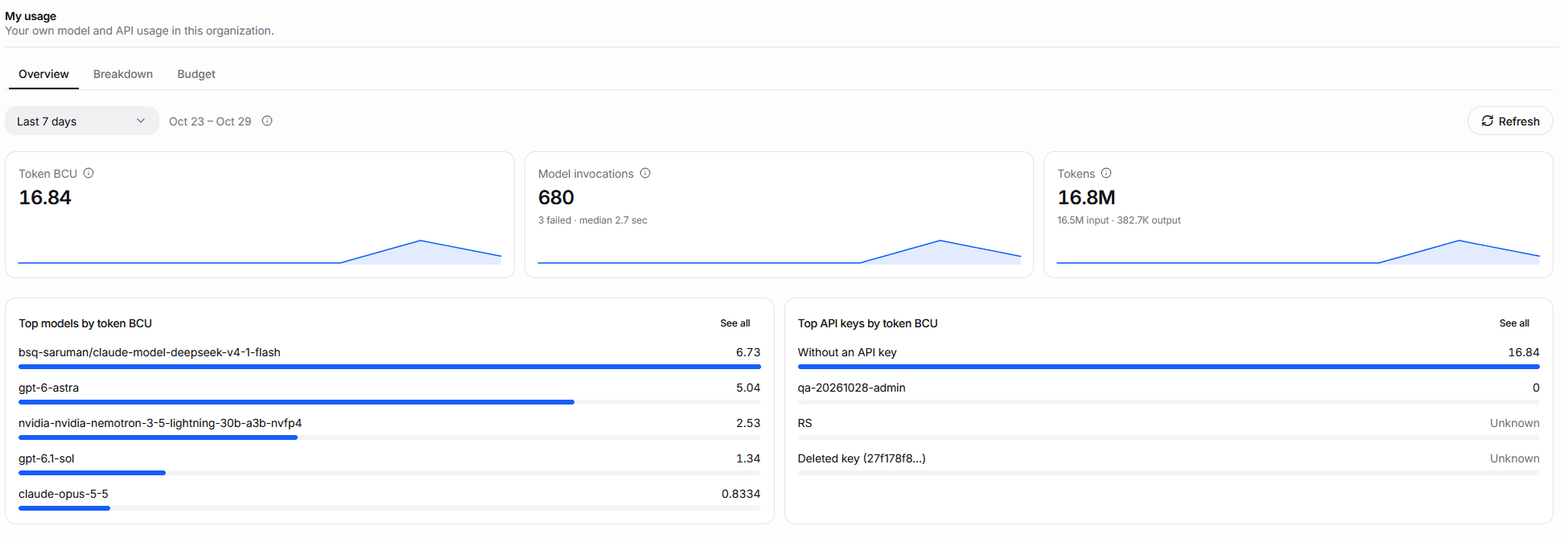
The Overview tab shows your totals for the period as tiles, each with a daily sparkline:
- Token BCU: your input and output tokens in BCU, at one BCU per million tokens on the default rate card.
- Model invocations: calls to a model made for you, with the number that failed and the median latency. One request can make several, such as a tool loop or a retry.
- Tokens: your input and output tokens, as the model servers reported them. Output tokens include reasoning tokens.
Below the tiles, Top models by token BCU and Top API keys by token BCU list the period's five largest. A model or key whose calls reported no tokens shows Unknown. See all opens the full list on the Breakdown tab.
The Breakdown tab opens with Daily trends, one chart per tab: Model invocations by outcome (completed, incomplete, failed, or cancelled), API requests to the BSQAI API by status (succeeded, client errors, and server errors), Tokens (input, output, and cached), BCU, and Latency (median and 95th percentile). Requests, invocations and tokens are separate measures and are never added together.
A token figure reads Unknown, never zero, when invocations were made but none of them reported tokens. A period without any model call shows 0.
Check freshness
Point at Refresh to see Up to date as of: the time of the latest stored usage. If your figures look incomplete, ask your platform administrator: whether records are missing for a period shows only in the Global organization's Data collection view.
A period without usage shows No usage in this period.
Break your usage down
Below the daily trends, Break usage down by groups the period's usage one way at a time, starting with Sources.
| View | Shows |
|---|---|
| Sources | Portal, API key, Workload for background work run for you, and Other signed-in client |
| Models | Each model by the name you call it |
| API keys | Each of your keys by name. Calls without a key, such as Portal chat, appear as Without an API key, and a deleted key as Deleted key with the start of its ID. Expand a key to see the applications you used it from. |
| Applications | Platform applications such as the Portal and Deep Research, and Reported applications that the calling tool names. Calls that name no application appear as Not reported. |
Each view lists Model invocations with the number that failed, Tokens, Token BCU, and API requests with client and server errors; Models has no API requests column. Turn on All columns to split tokens into input, output, and cached, and to add the median latency.
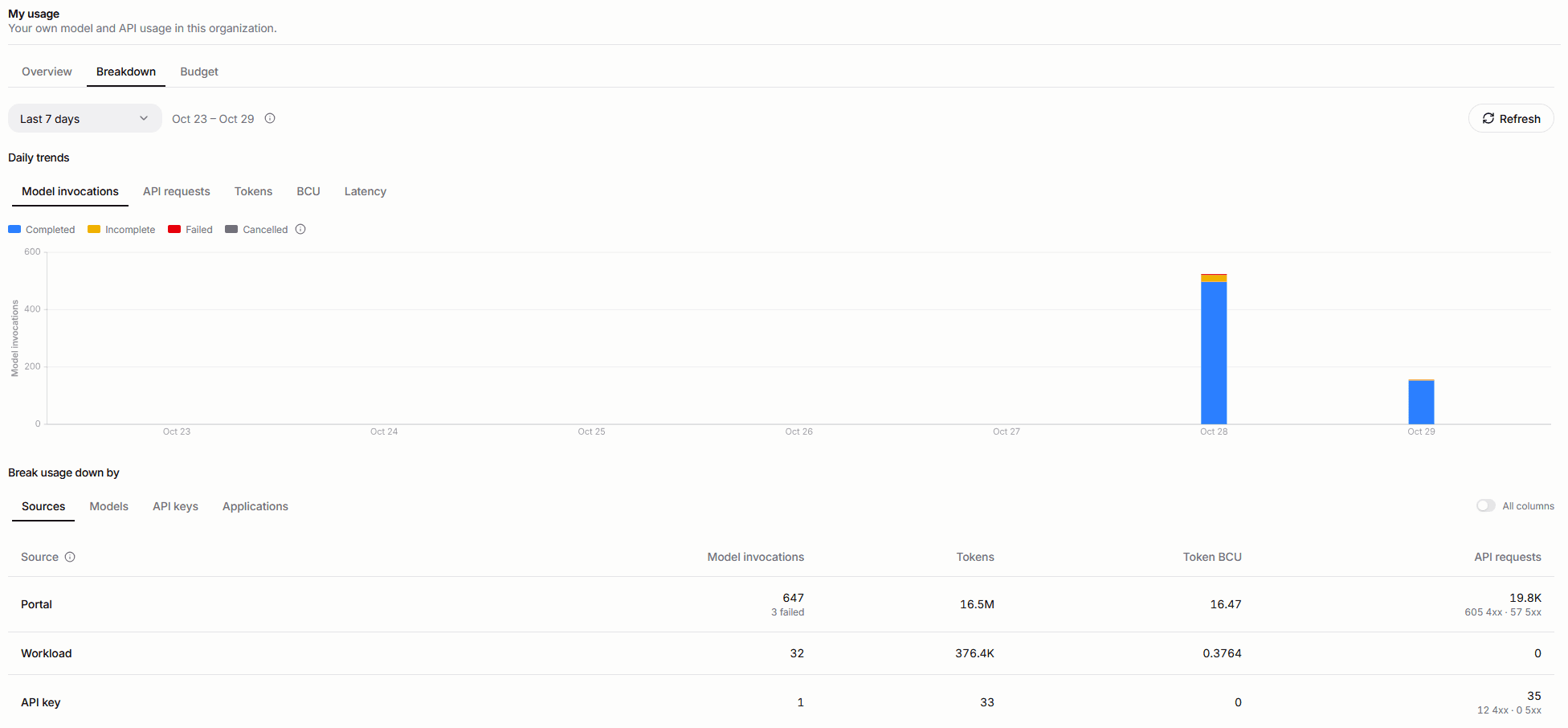
One key used from several tools, such as Claude Code and a notebook, shows each tool's share when you expand it. A tool is listed by name when it is Claude Code or OpenCode, or when it sends an X-Title or X-OpenRouter-Title header, an HTTP-Referer header, or a User-Agent header.
Check your budget
The Budget tab shows your monthly BCU cap in the active organization, and the caps of the groups that fund your API keys. It always covers the current Europe/London calendar month, whatever period the other tabs show, so it has no period selector.
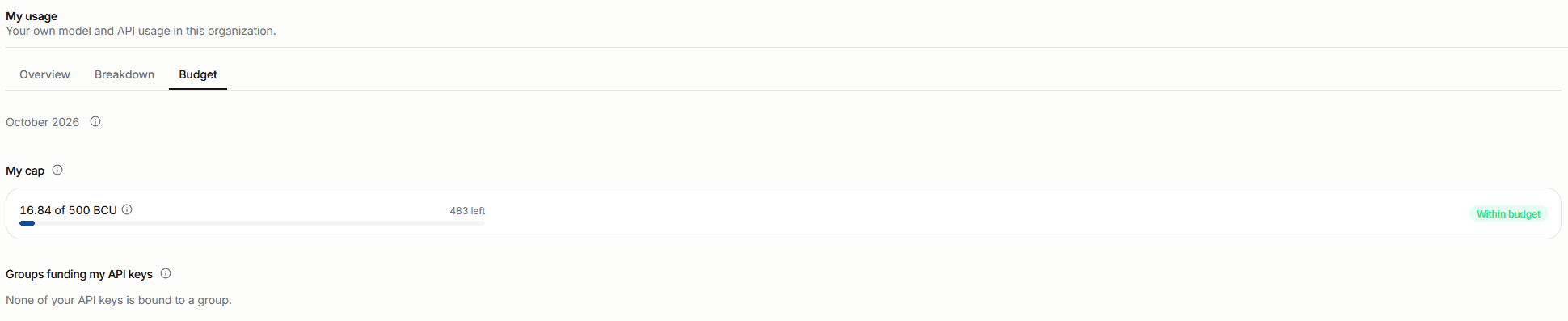
- My cap covers your Portal use, background work run for you and all your API keys. It shows what you consumed this month against your cap, with what is left or over. No cap means none is set for you.
- Groups funding my API keys lists each group that one of your API keys is bound to, the Team chosen when you created the key. It shows the BCU of every key bound to the group, other members' included, against the group's cap, and names no other member or key.
- Calls whose model server reported no tokens are not in the BCU; when there are any, the info icon next to the figure says how many. Calls to predictive models never carry tokens and are not counted there.
When your cap is reached, or set to 0, new requests are refused until a tenant administrator raises it or the month ends. A banner at the top of the Portal's main pages, such as chat and Files, says so. Requests already running finish and still count. A request with an API key is also refused when the cap of the key's group is reached. The BSQAI API answers a refused request with 429 usage_cap_reached; see What a refused call looks like.
You see only your own cap and the groups of your keys. Tenant administrators set the caps; see Manage monthly BCU allowances and caps.
Read your usage through the API
GET /v1/usage/me returns the same figures, and also your tokens in BCU as tokens.bcu. It needs only membership of the organization (tenant.read), so a personal API key that you granted tenant.read can read your usage too. The parameters and errors are those of the usage summaries API, without a per-user breakdown.
GET /v1/usage/budgets/me returns your budget for the current month: user is your own balance, and groups holds the balances of the groups funding your API keys. It also needs only tenant.read. Each balance's fields are described in Remaining and overage.