Cloud and external models
Serve models that run at a cloud provider or on another server through model routes in the BSQAI API.
A model that runs outside BullSequana AI, at a cloud provider such as Azure OpenAI or Anthropic or on another server, is not deployed with the Model Installer API. A platform administrator adds it as a model route. The BSQAI API then serves the model under the route's model name, to the members that an allow rule lets call it. A route that you add starts with no rule, so nobody can call the model until one exists.
Applications call the model through the BSQAI API by that name, like any other model. The model server's address and API key stay in the BSQAI API.
Model routes and connections
The BSQAI API sends each generation, embedding, and rerank request to the server that the route of the requested model name points to.
| Record | What it holds |
|---|---|
| Connection | A model server: its base URL, its protocol, an API key, how long one request may take, and how many times a failed request is sent again |
| Route | The model name that clients send, the connection to the model's server, the upstream model name that server expects, the API the model is called with, the model's mode, and optional limits, capabilities, and tags |
Several routes can share one connection, for example the models of one Azure OpenAI resource.
The Model Installer adds a connection and a route for each model that it deploys, and removes both with the deployment. A predictive model's connection speaks KServe's V2 inference protocol or a custom container's HTTP API, and applications call the model by its serving endpoint. Administrators cannot change the installer's records, except to correct what an installed chat model can do and to choose which tenants may use a Global model. Platform administrators add, change, and delete all other connections and routes, which speak the OpenAI or the Anthropic API.
Portal chat, Build, Agents, the Chat Completions (/v1/chat/completions), Responses (/v1/responses), embeddings (/v1/embeddings), rerank (/v1/rerank), and Anthropic-compatible (/anthropic) APIs, retrieval embeddings and reranking, image descriptions, and Deep Research all reach their models through routes. The BSQAI API reads the route on every request, so a change applies to the next request. Speech-to-text and text-to-speech go to Speaches and do not use routes.
Protocols and APIs
A connection speaks one of two protocols. Each route calls its model with an API that its connection's protocol offers.
| Protocol | Base URL | APIs | Modes |
|---|---|---|---|
| OpenAI-compatible | The URL that paths such as /chat/completions are added to. It usually ends in /v1. | Chat Completions or Responses | Any |
| Anthropic-compatible | The server's root URL, which /v1/messages is added to | Messages | Chat only |
Most model servers, vLLM among them, are OpenAI-compatible. For Azure OpenAI and Azure AI Foundry, add /openai/v1 to the resource's endpoint, as in https://<resource>.cognitiveservices.azure.com/openai/v1, and use the deployment name as the upstream model. Choose Responses only for a server that offers OpenAI's Responses API.
Under an OpenAI-compatible base URL, the BSQAI API requests embeddings from /embeddings and reranking from /rerank. A model called with Messages serves chat only. An embedding or rerank request for it is refused with 400 model_api_unsupported.
A connection's protocol cannot change while routes use it.
With the platform's network policies on, the BSQAI API reaches servers outside the cluster only at the addresses in NETWORK_POLICY_EXTERNAL_EGRESS_CIDRS, and only on the ports in LLM_BACKEND_NETWORK_POLICY_EXTERNAL_PORTS, 443 and 80 by default. A model server on another port, such as https://<host>:8000/v1, fails Test connection with "Could not reach the model server" until the platform operator adds the port.
A KServe deployment that serves LoRA adapters has one connection for the base model and all its adapters. Each adapter's route uses that connection and sends the adapter's name as the upstream model, and it takes its API and mode from the base model's route. See Update adapters.
In Portal chat, the BSQAI API ends a turn with the error code chat_content_blocked when the model server reports a block. A block is a message or an answer that the server's safety guardrail rejected, or a refusal by the model. Chats with an Agent and Build chats get the same code. Applications that call the BSQAI API under /v1 or /anthropic do not get this code.
The block codes are content_filter, ResponsibleAIPolicyViolation, invalid_prompt, bio_policy, misalignment_policy_violation, and image_content_policy_violation. On every API, an HTTP 400 error is a block when the error's code, or the innererror.code that Azure OpenAI adds, is a block code. Each API also signals a block in its answer:
| API | Block signal |
|---|---|
| Chat Completions | finish_reason is content_filter, or a refusal instead of the answer |
| Responses | An incomplete response with the reason content_filter, a refusal output, or a failed response with a block code |
| Messages | stop_reason is refusal |
The BSQAI API does not treat a guardrail error with another status or code as a block. It ends that turn with chat_internal_error, and Portal chat offers Continue and Try again. A refusal that the model writes as ordinary answer text is not a block either. When a response ends early describes what users can do after a block.
Capabilities
A route can state three capabilities of its model. Each one is Yes, No, or Not stated. Not stated means unknown, which is not the same as No.
| Capability | Effect |
|---|---|
| Image input | Chat accepts image attachments only for a model whose image input is Yes. |
| Tool calling | Chat sends no tools to a model whose tool calling is No: the composer hides Tools, and the model answers without web search, Connectors, or Skill tools. Chat refuses a request that needs tools with 400 model_tools_unsupported. The model's Use model tab in Studio states whether the model calls tools, which coding agents need. |
| Reasoning | Chat shows a reasoning effort control unless reasoning is No. A model whose reasoning is No accepts only the effort none. |
Chat sends tools to a model whose tool calling is Not stated. A vLLM model served without --enable-auto-tool-choice and --tool-call-parser refuses them, and chat fails with model_tools_unsupported. Deploy the model again with those arguments, or set its tool calling to No.
A route can also list the reasoning efforts that the model rejects, from none, minimal, low, medium, high, and xhigh. Chat stops offering them. Chat and the Responses API refuse a request with one of them with 400 reasoning_effort_unsupported, before the request reaches the server. The Anthropic-compatible API does not check its thinking setting against the list. The server decides what every other effort does.
Max tokens, Max input tokens, and Max output tokens are optional. With Max input tokens set, chat compacts a long conversation before it exceeds the model's context window. Studio also writes the input and output limits into the coding-agent configurations on the model's Use model tab.
On an embedding model, Max input tokens also sets how much text the BSQAI API sends to the model at once. The BSQAI API counts each text's tokens with the tokenizer of OpenAI's embedding models. A text longer than three quarters of the limit is split into pieces of that size, and the pieces' vectors are averaged into one vector for the text. The margin covers models whose own tokenizer counts more tokens for the same text. Without Max input tokens, texts are split at 2,048 tokens, so set it for a model that accepts fewer.
Tags
Tags are free text. The tag on-prem lists a model as Local in Studio, and a route without it is listed as External. The Model Installer tags the models it deploys with on-prem by default.
Add a model in Studio
Adding a model requires platform.global_service.manage in the Global organization.
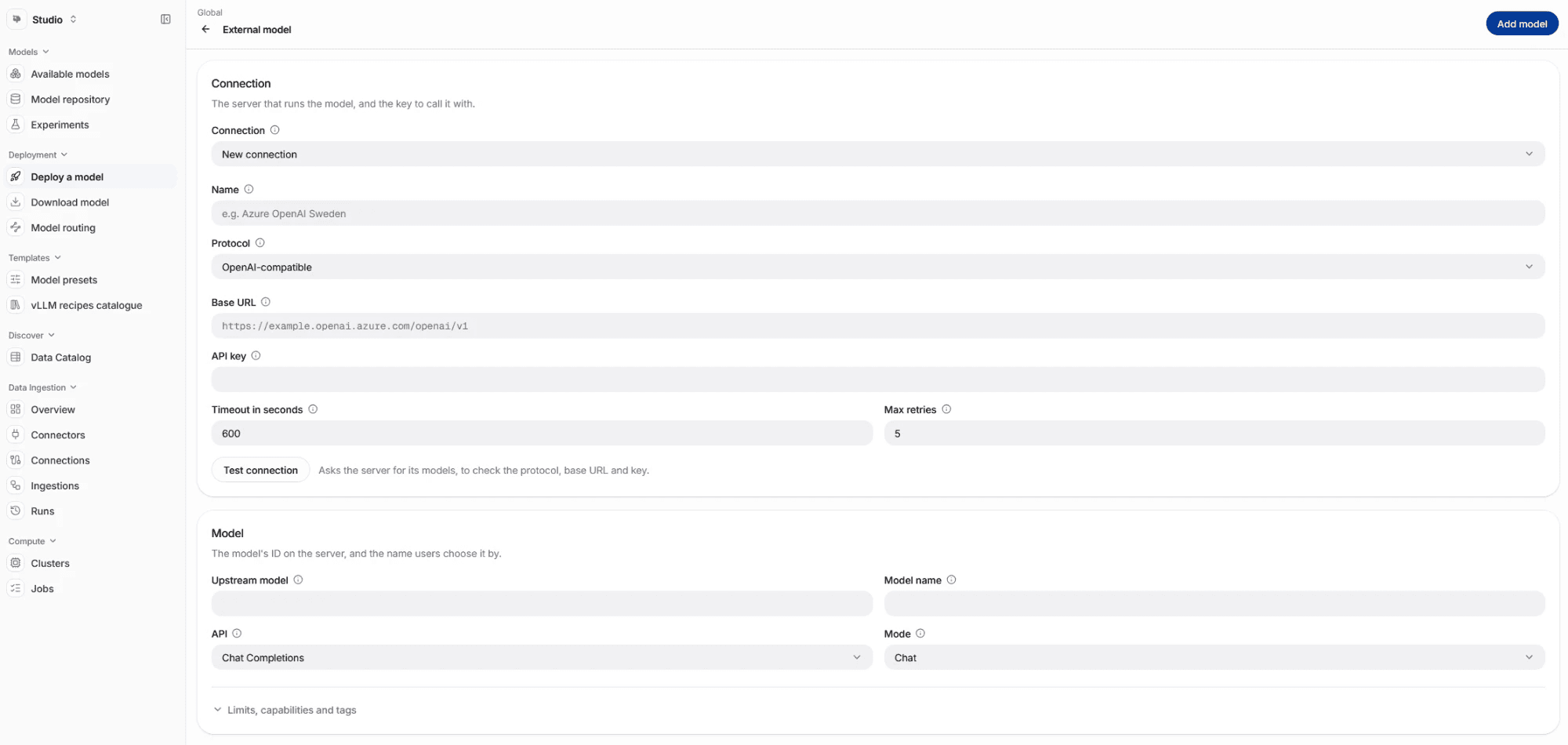
- In Studio, open Deploy a model, and under External model select Add external model. The same action on Available models opens the same page.
- Under Connection, choose a connection that you added before. For a new server, keep New connection and enter its Name, Protocol (OpenAI-compatible by default), Base URL, and API key. Only administrators see the name. The key is stored encrypted and never shown again; leave it blank for a server that needs no key. Timeout in seconds and Max retries default to 600 and 5.
- Select Test connection. The BSQAI API asks the server for its models, which checks the protocol and the base URL. It checks the key only on a server that requires a key to list its models. Some servers, such as OpenRouter, list their models to anyone, and a wrong key fails only at the first model call. When the server lists models, Upstream model offers them.
- Under Model, enter the Upstream model, or pick one the server lists, and the Model name that users and clients choose the model by. Model name follows what you type as the upstream model until you change it. Then choose the API and the Mode, which default to Chat Completions and Chat.
- Optionally, open Limits, capabilities and tags and fill in what you know about the model.
- Select Add model at the top right of the page.
- Let members use the model. Select Access on the model's row in Available models, and give All Members, groups, or users Can use, and select Save. Platform administrators set these rules for the Global organization. Each tenant's administrators set them for their own tenant.
The test saves nothing. When it fails, it shows the reason:
| Message | Cause |
|---|---|
| "The model server refused the API key. Check the key, or add one if the server needs it." | The key is wrong, or the server needs a key and none was entered. |
| "The server did not answer like an API of the connection's protocol. Check the protocol and the base URL: an OpenAI-compatible one often ends in /v1." | The protocol or the base URL is wrong. |
| "Could not reach the model server, or it failed to answer. Check the base URL, and try again." | The server is unreachable from the cluster, did not answer in time, or answered with a server error. |
The model then appears in Available models, and the Portal offers it wherever its mode fits, to the members who may call it. A member without a rule cannot call it, and the model is missing from their model pickers. Change or delete it later under Model routing in Studio.
Choose which tenants may use the model
A model that a platform administrator adds may be used by every tenant. To narrow it, select the people button at the end of the route's row under Model routing, then under Who may use it choose All tenants, Chosen tenants, or Owner only. With Chosen tenants, pick at least one tenant under Tenants, then select Save. Each tenant still decides with its own allow rules which of its members may call the model. Model access and publishing API describes the same choice through the API.
Add a model with the API
The model routing endpoints are under /v1/admin. Each one, including the reads, requires platform.global_service.manage.
| Endpoint | Use |
|---|---|
GET, POST /v1/admin/model-connections | List connections, or add one |
GET, PUT, DELETE /v1/admin/model-connections/{id} | Read, replace, or delete a connection |
POST /v1/admin/model-connections/test | Test a server before you add it. Nothing is saved. |
POST /v1/admin/model-connections/{id}/test | Test a saved connection with its stored key |
GET, POST /v1/admin/model-routes | List routes, or add one |
GET, PUT, DELETE /v1/admin/model-routes/{id} | Read, replace, or delete a route |
PUT /v1/admin/model-routes/{id}/capabilities | Correct what an installed chat model can do. Send the route's deployment_revision as you read it. |
PUT /v1/admin/model-routes/{id}/audience | Choose which tenants besides its owner may use the model: {"audience": "everyone"}, {"audience": "owner"}, or {"audience": "listed", "tenant_ids": [...]} |
Add the connection first. Send a platform administrator's access token as the bearer token:
export BSQAI_API="https://<bsqai-api-host>"
export TOKEN="<platform-administrator-access-token>"

curl -sS "$BSQAI_API/v1/admin/model-connections" \
  -H "Authorization: Bearer $TOKEN" \
  -H "Content-Type: application/json" \
  -d '{
    "name": "Azure OpenAI Sweden",
    "protocol": "openai",
    "base_url": "https://<resource>.cognitiveservices.azure.com/openai/v1",
    "api_key": "<azure-api-key>"
  }'
The response carries the connection's id. Then add a route to it:
curl -sS "$BSQAI_API/v1/admin/model-routes" \
  -H "Authorization: Bearer $TOKEN" \
  -H "Content-Type: application/json" \
  -d '{
    "alias": "gpt-4.1",
    "connection_id": "<connection-id>",
    "upstream_model": "<azure-deployment-name>",
    "api_style": "chat_completions",
    "mode": "chat",
    "supports_vision": true,
    "supports_function_calling": true
}'| Connection field | Meaning |
|---|---|
name | Required, up to 255 characters, unique among connections |
protocol | openai (the default) or anthropic |
base_url | Required. A user name or password in the URL is refused; send the key as api_key. |
api_key | Optional and write-only. Responses carry has_api_key instead. On PUT, omit it to keep the stored key, or send null to remove it. |
timeout_seconds | 1 to 6,000. The default is 600. |
max_retries | 0 to 10. The default is 5. |
| Route field | Meaning |
|---|---|
alias | Required. The model name that clients send, up to 255 characters, unique among routes |
connection_id | Required. The connection to the model's server |
upstream_model | Required. The name the server expects, such as an Azure deployment name |
api_style | chat_completions (the default) or responses on an openai connection, messages on an anthropic one |
mode | chat, completion, embedding, rerank, audio-speech, audio-transcription, image-generation, or realtime. Omit it for an unknown mode. A messages route must be chat. |
max_tokens, max_input_tokens, max_output_tokens, vector_dimensions | Optional positive integers |
supports_vision, supports_function_calling, supports_reasoning | true, false, or null for not stated |
unsupported_reasoning_efforts | The efforts that the model rejects |
tags | Free text. on-prem lists the model as local. |
Responses also carry owner_tenant_id, the organization that owns the model, or null for the Global organization, and audience and audience_tenant_ids, which tenants besides the owner may use it. A route that you add has the audience everyone. Change the audience only with the audience endpoint.
A PUT replaces the whole record. The most common errors are:
| Status and code | Cause |
|---|---|
400 model_server_refused_key | A test was refused the key, or the server needs one |
400 model_server_unexpected_response | A test got an answer that is not a model list, usually because of the base URL |
503 model_server_unavailable | A test could not reach the server, or the server failed to answer |
409 model_connection_name_taken, model_route_alias_taken | Another connection has the name, or another route has the model name |
409 model_route_api_style_unsupported | The connection's protocol does not offer the route's API |
409 model_connection_in_use | Routes still use the connection that you are deleting, or whose protocol you are changing |
409 model_managed_by_installer | The record belongs to the Model Installer |
409 model_claim_fixed_by_deployment, model_route_claims_not_correctable, model_route_deployment_changed | A capability correction changes what the deployment's flags set, is not for an installed chat model, or is for a deployment that changed since you read the route |
Usage and budgets
Every model call through a route, to an external model or an installed one, is recorded as usage for the calling tenant, member, and API key, and counts in BCU. A member, or the group that funds an API key, whose monthly cap is reached gets 429 usage_cap_reached, with the OpenAI error type insufficient_quota on the OpenAI-compatible APIs. A tenant over its allowance keeps working. See Manage monthly BCU allowances and caps and Usage analytics.
Embedding and rerank models
Add an embedding or rerank model with an OpenAI-compatible connection and the mode Embedding or Rerank.
There is no vector dimension to configure for retrieval. When a tenant administrator selects an embedding model, the BSQAI API measures its dimension with one embedding. See Document processing and reindexing.
Each tenant's settings record its embedding model by name. Keep an embedding model's name: selecting another name for a tenant starts a reindex.
Naming
- The model name is the value that clients send as
model. No two routes can share one. - Keep names stable. Tenant settings, Agents, and API clients refer to models by name. After a rename or a deletion, their requests fail with 404
model_not_found. - Choose a name that reads well to users, such as
gpt-4.1, rather than a provider's deployment ID. The upstream model holds the name the server expects.
Common mistakes
- A base URL that ends in
/chat/completionsor/v1/messages. Enter the URL that those paths are added to. - A user name or password in the base URL. Enter the key under API key.
- Responses for a server that offers only Chat Completions.
- Not stated image input for a model that reads images. Chat then refuses image attachments for it.
- An Anthropic-compatible connection for an embedding or rerank model.